How to list iptables rules with counters
Listing iptables rules with counters shows which runtime firewall rules are loaded and whether traffic is matching them before you delete, reorder, or persist anything. Packet and byte counters identify the rules that have handled traffic, and line numbers show each rule's current position for follow-up commands.
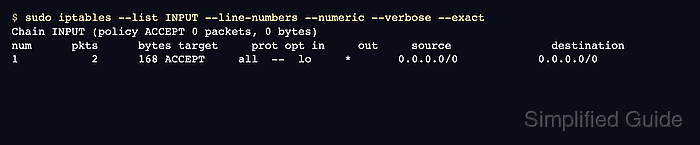
The default iptables table is filter, where INPUT, FORWARD, and OUTPUT handle local inbound, routed, and locally generated packets. Listing a specific chain keeps the output readable while still showing chain policy, packet counters, byte counters, targets, interfaces, sources, destinations, and matches.
Counters belong to the live kernel ruleset and can change while traffic is flowing. Use exact counters when rounded values hide small changes, list nat or another table explicitly when the expected rule is outside filter, and check the active backend when a modern distribution exposes iptables through the nftables compatibility layer.
Related: How to check the active iptables backend
Related: How to delete an iptables rule
Steps to list iptables rules with counters:
- List one chain in the default filter table with line numbers, numeric addresses, and verbose counters.
$ sudo iptables --list INPUT --line-numbers --numeric --verbose
Chain INPUT (policy ACCEPT 0 packets, 0 bytes)
num   pkts bytes target     prot opt in     out     source               destination
1        0     0 ACCEPT     all  --  lo     *       0.0.0.0/0            0.0.0.0/0
--numeric avoids reverse DNS and service-name lookups. --line-numbers shows positions for follow-up commands that refer to a rule by number.
- Read the pkts and bytes columns for the chain and each rule.
A rule with zero counters has not matched packets since the counter was created or last cleared. A chain policy counter increases only for packets that reach the policy after no rule matched.
- Send one controlled packet or connection through the path being audited.
Use the normal client, health check, or test host for the service. Avoid adding temporary production rules just to make counters move.
- List the same chain again with exact counters and compare the values.
$ sudo iptables --list INPUT --line-numbers --numeric --verbose --exact
Chain INPUT (policy ACCEPT 0 packets, 0 bytes)
num      pkts      bytes target     prot opt in     out     source               destination
1           2      168 ACCEPT     all  --  lo     *       0.0.0.0/0            0.0.0.0/0
--exact prevents rounded K, M, and G counter suffixes in verbose list output.
- List the relevant table when the expected rule is not in the default filter table.
$ sudo iptables --table nat --list PREROUTING --line-numbers --numeric --verbose
Chain PREROUTING (policy ACCEPT 0 packets, 0 bytes)
num   pkts bytes target     prot opt in     out     source               destination
Use ip6tables for IPv6 rules. IPv4 iptables output does not prove the IPv6 firewall state.
- Print command-form rules when you need the exact match syntax beside the counter view.
$ sudo iptables --list-rules INPUT
-P INPUT ACCEPT
-A INPUT -i lo -j ACCEPT
--list-rules does not show packet or byte counters. Use it after the verbose list when copying, comparing, or documenting the rule syntax.
- Leave counters intact unless clearing them is part of the audit.
Do not add --zero to a listing command during a read-only audit. iptables --list --zero prints counters and clears them atomically.