How to view connection tracking state for iptables
Stateful iptables rules depend on the Linux connection-tracking table, so rule counters alone may not explain why reply traffic is accepted or why a NAT flow keeps using an old translation. Viewing conntrack state shows the flows the kernel is tracking behind ESTABLISHED, RELATED, and NAT-aware matches.
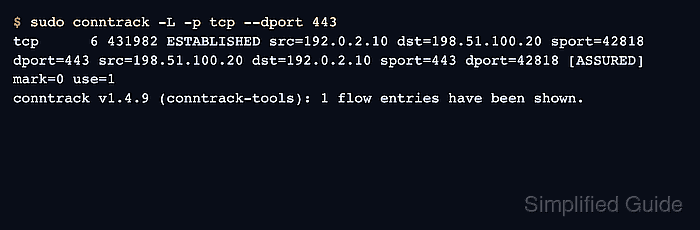
The conntrack command reads the Netfilter connection-tracking subsystem from userspace. It can list current flows, show summary counters, filter by protocol or port, and watch new flow events while traffic is being tested.
Run read-only listing commands first on busy gateways. Deleting or updating entries can interrupt live sessions, so keep this workflow to inspection unless the page's task is an explicit repair or cleanup.
Steps to view iptables connection tracking state:
- Confirm the conntrack command is available.
$ conntrack -V
conntrack v1.4.9 (conntrack-tools)
conntrack-tools is packaged by current Linux distributions. Install that package first when the command is missing.
- Print connection-tracking summary counters.
$ sudo conntrack -S
cpu=0   	found=18 invalid=0 insert=4 insert_failed=0 drop=0 early_drop=0 error=0 search_restart=0 clash_resolve=0 chaintoolong=0
cpu=1   	found=12 invalid=0 insert=3 insert_failed=0 drop=0 early_drop=0 error=0 search_restart=0 clash_resolve=0 chaintoolong=0
Large drop, insert_failed, or early_drop values can indicate table pressure or unsupported tracking paths. Use the flow list next to identify what is active.
- List all currently tracked flows.
$ sudo conntrack -L
tcp      6 431982 ESTABLISHED src=192.0.2.10 dst=198.51.100.20 sport=42818 dport=443 src=198.51.100.20 dst=192.0.2.10 sport=443 dport=42818 [ASSURED] mark=0 use=1
conntrack v1.4.9 (conntrack-tools): 1 flow entries have been shown.
A quiet host can legitimately show zero entries. Generate one controlled connection through the path being checked when the table is empty.
- Filter the list to the protocol and destination port being investigated.
$ sudo conntrack -L -p tcp --dport 443
tcp      6 431982 ESTABLISHED src=192.0.2.10 dst=198.51.100.20 sport=42818 dport=443 src=198.51.100.20 dst=192.0.2.10 sport=443 dport=42818 [ASSURED] mark=0 use=1
conntrack v1.4.9 (conntrack-tools): 1 flow entries have been shown.
Filtering inside conntrack keeps the output readable without piping through text filters that can hide fields needed for NAT or state debugging.
- Watch new flow events during a controlled client test.
$ sudo conntrack -E -p tcp
    [NEW] tcp      6 120 SYN_SENT src=192.0.2.10 dst=198.51.100.20 sport=42818 dport=443 [UNREPLIED] src=198.51.100.20 dst=192.0.2.10 sport=443 dport=42818
 tcp      6 431999 ESTABLISHED src=192.0.2.10 dst=198.51.100.20 sport=42818 dport=443 src=198.51.100.20 dst=192.0.2.10 sport=443 dport=42818 [ASSURED]
Stop the event stream with Ctrl-C after the test. Use a maintenance shell or terminal multiplexer on production gateways so the watch does not get lost during handoff.
- Compare the tracked flow with the firewall rule that should match it.
$ sudo iptables --list INPUT --line-numbers --numeric --verbose --exact
Chain INPUT (policy DROP 0 packets, 0 bytes)
num      pkts      bytes target     prot opt in     out     source               destination
1          18       1512 ACCEPT     all  --  *      *       0.0.0.0/0            0.0.0.0/0            ctstate RELATED,ESTABLISHED
The conntrack flow state explains why RELATED,ESTABLISHED rules accept reply packets. The iptables counter proves that packets are actually reaching the rule.
Related: How to allow established connections with iptables - Inspect NAT translations from the tracked flow when gateway rules are involved.
$ sudo conntrack -L -p tcp --dport 8080
tcp      6 431998 ESTABLISHED src=198.51.100.55 dst=203.0.113.10 sport=51540 dport=8080 src=10.10.0.20 dst=198.51.100.55 sport=80 dport=51540 [ASSURED] mark=0 use=1
DNAT and SNAT flows show both original and reply-direction tuples. Compare those addresses with nat table counters before changing a translation rule.
- Leave the state table unchanged after a read-only inspection.
Do not run conntrack -D or conntrack -F during a normal check. Removing entries can interrupt active sessions and force NAT clients to reconnect.