How to upgrade Hyperledger Fabric chaincode
Upgrading Hyperledger Fabric chaincode replaces the channel's agreed smart contract definition with the next lifecycle sequence. Operators use this process when a contract package changes, when an endorsement policy changes, or when a private data collection definition must move forward on an existing channel.
The Fabric lifecycle does not use a separate upgrade command. Channel organizations approve a new definition for the same chaincode name, increment the sequence by one, and commit that definition after the required lifecycle endorsements are ready. A new package ID is required only when the chaincode binaries change.
The sample values use the fabric-samples test network, mychannel, Org1MSP, Org2MSP, and the JavaScript asset-transfer-basic chaincode as the upgraded package. Replace the channel name, peer addresses, MSP paths, orderer certificate, package label, and smoke-test transaction for a production network.
Steps to upgrade Hyperledger Fabric chaincode with the Fabric lifecycle:
- Change to the Fabric test network directory.
$ cd fabric-samples/test-network
The channel should already have the chaincode committed at the previous sequence before the upgrade starts.
- Set the chaincode upgrade values.
$ export CHANNEL_NAME=mychannel
$ export CC_NAME=basic
$ export CC_VERSION=2.0
$ export CC_SEQUENCE=2
$ export CC_LABEL=basic_2.0
Use the next integer after the currently committed sequence. Every organization approving the upgrade must use the same chaincode name, version, sequence, policy, and collection settings.
- Add the Fabric binaries and sample config directory to the current shell.
$ export PATH="$PWD/../bin:$PATH"
$ export FABRIC_CFG_PATH="$PWD/../config"
- Check the currently committed chaincode definition.
$ peer lifecycle chaincode querycommitted --channelID "$CHANNEL_NAME" --name "$CC_NAME"
Committed chaincode definition for chaincode 'basic' on channel 'mychannel':
Version: 1.0, Sequence: 1, Endorsement Plugin: escc, Validation Plugin: vscc, Approvals: [Org1MSP: true, Org2MSP: true]
- Install the dependencies for the new JavaScript chaincode package.
$ npm --prefix ../asset-transfer-basic/chaincode-javascript install
up to date, audited 361 packages in 5s
##### snipped #####
Use the dependency command that matches the chaincode language being packaged. A policy-only upgrade can skip packaging and installation, but it still needs the next sequence.
- Package the upgraded chaincode.
$ peer lifecycle chaincode package basic_2.tar.gz \
  --path ../asset-transfer-basic/chaincode-javascript/ \
  --lang node \
  --label "$CC_LABEL"
- Calculate the package ID for the new package.
$ peer lifecycle chaincode calculatepackageid basic_2.tar.gz
basic_2.0:4ffe6089ad9b3f0a3f352a7af0270f3363cf4157cd1b86807931dc27d6b1fe14
- Save the new package ID.
$ export NEW_CC_PACKAGE_ID=basic_2.0:4ffe6089ad9b3f0a3f352a7af0270f3363cf4157cd1b86807931dc27d6b1fe14
Do not copy the sample package ID into another network. The hash changes when the package content or label changes.
- Set the Org1 admin environment.
$ export CORE_PEER_TLS_ENABLED=true
$ export CORE_PEER_LOCALMSPID=Org1MSP
$ export CORE_PEER_MSPCONFIGPATH="$PWD/organizations/peerOrganizations/org1.example.com/users/Admin@org1.example.com/msp"
$ export CORE_PEER_TLS_ROOTCERT_FILE="$PWD/organizations/peerOrganizations/org1.example.com/peers/peer0.org1.example.com/tls/ca.crt"
$ export CORE_PEER_ADDRESS=localhost:7051
$ export ORDERER_CA="$PWD/organizations/ordererOrganizations/example.com/orderers/orderer.example.com/msp/tlscacerts/tlsca.example.com-cert.pem"
$ export ORG1_TLS_ROOTCERT="$PWD/organizations/peerOrganizations/org1.example.com/peers/peer0.org1.example.com/tls/ca.crt"
$ export ORG2_TLS_ROOTCERT="$PWD/organizations/peerOrganizations/org2.example.com/peers/peer0.org2.example.com/tls/ca.crt"
- Install the upgraded package on the Org1 peer.
$ peer lifecycle chaincode install basic_2.tar.gz
2026-06-21 06:12:11.441 UTC [chaincodeCmd] install -> INFO 001 Installed remotely: response:<status:200 payload:"\nbasic_2.0:4ffe6089ad9b3f0a3f352a7af0270f3363cf4157cd1b86807931dc27d6b1fe14\022\tbasic_2.0" >
2026-06-21 06:12:11.441 UTC [chaincodeCmd] install -> INFO 002 Chaincode code package identifier: basic_2.0:4ffe6089ad9b3f0a3f352a7af0270f3363cf4157cd1b86807931dc27d6b1fe14
- Confirm that Org1 can see the old and new packages.
$ peer lifecycle chaincode queryinstalled
Installed chaincodes on peer:
Package ID: basic_1.0:8f65c6a2d4b1d8e6a4f9c1e0a77b5ed22a9569e8a1a4cf2d5bf2d1a29128a928, Label: basic_1.0
Package ID: basic_2.0:4ffe6089ad9b3f0a3f352a7af0270f3363cf4157cd1b86807931dc27d6b1fe14, Label: basic_2.0
- Approve the upgraded chaincode definition for Org1.
$ peer lifecycle chaincode approveformyorg \
  -o localhost:7050 \
  --ordererTLSHostnameOverride orderer.example.com \
  --channelID "$CHANNEL_NAME" \
  --name "$CC_NAME" \
  --version "$CC_VERSION" \
  --package-id "$NEW_CC_PACKAGE_ID" \
  --sequence "$CC_SEQUENCE" \
  --tls \
  --cafile "$ORDERER_CA"
2026-06-21 06:13:02.508 UTC [chaincodeCmd] ClientWait -> INFO 001 txid [6f859e4deffb6e4c940e8dbb4c94ab86ae9be7f9e5bcf8042ff07aeff5d9f611] committed with status (VALID) at localhost:7051
- Set the Org2 admin environment.
$ export CORE_PEER_LOCALMSPID=Org2MSP
$ export CORE_PEER_MSPCONFIGPATH="$PWD/organizations/peerOrganizations/org2.example.com/users/Admin@org2.example.com/msp"
$ export CORE_PEER_TLS_ROOTCERT_FILE="$ORG2_TLS_ROOTCERT"
$ export CORE_PEER_ADDRESS=localhost:9051
- Install the upgraded package on the Org2 peer.
$ peer lifecycle chaincode install basic_2.tar.gz
2026-06-21 06:13:38.729 UTC [chaincodeCmd] install -> INFO 001 Installed remotely: response:<status:200 payload:"\nbasic_2.0:4ffe6089ad9b3f0a3f352a7af0270f3363cf4157cd1b86807931dc27d6b1fe14\022\tbasic_2.0" >
2026-06-21 06:13:38.729 UTC [chaincodeCmd] install -> INFO 002 Chaincode code package identifier: basic_2.0:4ffe6089ad9b3f0a3f352a7af0270f3363cf4157cd1b86807931dc27d6b1fe14
Install the new package on every peer that must endorse transactions with the upgraded chaincode.
- Approve the upgraded chaincode definition for Org2.
$ peer lifecycle chaincode approveformyorg \
  -o localhost:7050 \
  --ordererTLSHostnameOverride orderer.example.com \
  --channelID "$CHANNEL_NAME" \
  --name "$CC_NAME" \
  --version "$CC_VERSION" \
  --package-id "$NEW_CC_PACKAGE_ID" \
  --sequence "$CC_SEQUENCE" \
  --tls \
  --cafile "$ORDERER_CA"
2026-06-21 06:14:04.184 UTC [chaincodeCmd] ClientWait -> INFO 001 txid [f0c3760c54301f0abe72a734f6bd52f719326760d538593480624b79db650489] committed with status (VALID) at localhost:9051
- Check whether the channel is ready to commit the upgraded definition.
$ peer lifecycle chaincode checkcommitreadiness \
  --channelID "$CHANNEL_NAME" \
  --name "$CC_NAME" \
  --version "$CC_VERSION" \
  --sequence "$CC_SEQUENCE" \
  --tls \
  --cafile "$ORDERER_CA" \
  --output json
{
        "approvals": {
                "Org1MSP": true,
                "Org2MSP": true
        }
}
A false approval means at least one organization has not approved the same lifecycle definition. Fix the mismatch before committing the upgrade.
- Commit the upgraded chaincode definition to the channel.
$ peer lifecycle chaincode commit \
  -o localhost:7050 \
  --ordererTLSHostnameOverride orderer.example.com \
  --channelID "$CHANNEL_NAME" \
  --name "$CC_NAME" \
  --version "$CC_VERSION" \
  --sequence "$CC_SEQUENCE" \
  --tls \
  --cafile "$ORDERER_CA" \
  --peerAddresses localhost:7051 \
  --tlsRootCertFiles "$ORG1_TLS_ROOTCERT" \
  --peerAddresses localhost:9051 \
  --tlsRootCertFiles "$ORG2_TLS_ROOTCERT"
2026-06-21 06:14:37.622 UTC [chaincodeCmd] ClientWait -> INFO 001 txid [95669c4a95b05ccfa808cc7247483d98df99bdb61d46b2cb04260a36a32993f0] committed with status (VALID) at localhost:7051
2026-06-21 06:14:37.623 UTC [chaincodeCmd] ClientWait -> INFO 002 txid [95669c4a95b05ccfa808cc7247483d98df99bdb61d46b2cb04260a36a32993f0] committed with status (VALID) at localhost:9051
The previous chaincode definition stays active until this commit succeeds.
- Query the committed definition after the upgrade.
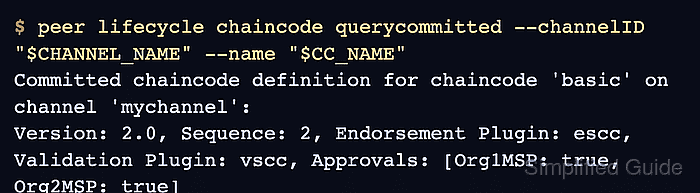
$ peer lifecycle chaincode querycommitted --channelID "$CHANNEL_NAME" --name "$CC_NAME"
Committed chaincode definition for chaincode 'basic' on channel 'mychannel':
Version: 2.0, Sequence: 2, Endorsement Plugin: escc, Validation Plugin: vscc, Approvals: [Org1MSP: true, Org2MSP: true]
- Invoke a smoke transaction through the upgraded chaincode.
$ peer chaincode invoke \
  -o localhost:7050 \
  --ordererTLSHostnameOverride orderer.example.com \
  --tls \
  --cafile "$ORDERER_CA" \
  -C "$CHANNEL_NAME" \
  -n "$CC_NAME" \
  --peerAddresses localhost:7051 \
  --tlsRootCertFiles "$ORG1_TLS_ROOTCERT" \
  --peerAddresses localhost:9051 \
  --tlsRootCertFiles "$ORG2_TLS_ROOTCERT" \
  -c '{"function":"CreateAsset","Args":["asset-upgrade-1","green","10","Amina","750"]}'
2026-06-21 06:15:18.956 UTC [chaincodeCmd] chaincodeInvokeOrQuery -> INFO 001 Chaincode invoke successful. result: status:200
Use a contract method that belongs to the upgraded release. If the upgraded definition uses --init-required, invoke the chaincode init function before normal transactions.
Related: How to invoke Hyperledger Fabric chaincode - Query the smoke-test asset from the ledger.
$ peer chaincode query -C "$CHANNEL_NAME" -n "$CC_NAME" -c '{"Args":["ReadAsset","asset-upgrade-1"]}'
{"ID":"asset-upgrade-1","color":"green","size":10,"owner":"Amina","appraisedValue":750}
The query confirms that the committed definition can run the upgraded chaincode and read the state written after the upgrade.
Related: How to query Hyperledger Fabric chaincode