How to invoke Hyperledger Fabric chaincode
Invoking Hyperledger Fabric chaincode submits a transaction proposal to endorsing peers and sends the endorsed write to the ordering service. Use it after a chaincode definition is committed, when ledger state needs to be created or changed from the peer CLI instead of through an application client.
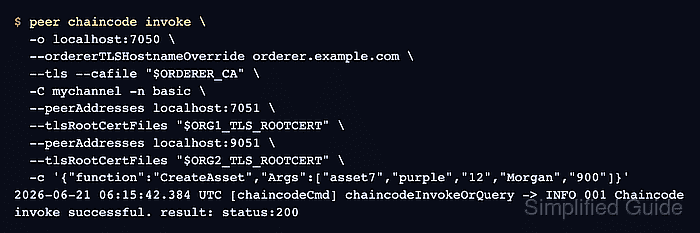
The fabric-samples test network provides a safe ledger target through the mychannel channel and the asset-transfer-basic chaincode deployed as basic. The peer CLI signs as the Org1 admin, targets both sample peers to satisfy the default endorsement policy, and uses the TLS root certificates generated under the test network's organizations directory.
Every valid invoke is a channel transaction, so run sample writes on a disposable network or replace the function and arguments with a transaction that belongs on the real ledger. A follow-up query for the same asset confirms that the write reached world state after endorsement, ordering, validation, and commit.
Steps to invoke Hyperledger Fabric chaincode:
- Change to the Fabric test network directory.
$ cd fabric-samples/test-network
The channel and chaincode should already be available. In the default samples, ./network.sh up createChannel creates mychannel and a committed basic chaincode definition makes the asset-transfer contract callable.
- Add the Fabric binaries and sample config directory to the current shell.
$ export PATH="$PWD/../bin:$PATH"
$ export FABRIC_CFG_PATH="$PWD/../config"
- Set the channel, chaincode, orderer, and peer TLS certificate paths.
$ export CHANNEL_NAME=mychannel
$ export CC_NAME=basic
$ export ORDERER_CA="$PWD/organizations/ordererOrganizations/example.com/orderers/orderer.example.com/msp/tlscacerts/tlsca.example.com-cert.pem"
$ export ORG1_TLS_ROOTCERT="$PWD/organizations/peerOrganizations/org1.example.com/peers/peer0.org1.example.com/tls/ca.crt"
$ export ORG2_TLS_ROOTCERT="$PWD/organizations/peerOrganizations/org2.example.com/peers/peer0.org2.example.com/tls/ca.crt"
Replace these paths when invoking chaincode on a different channel, orderer, or peer set.
- Set the Org1 admin identity for the peer CLI.
$ export CORE_PEER_TLS_ENABLED=true
$ export CORE_PEER_LOCALMSPID=Org1MSP
$ export CORE_PEER_MSPCONFIGPATH="$PWD/organizations/peerOrganizations/org1.example.com/users/Admin@org1.example.com/msp"
$ export CORE_PEER_TLS_ROOTCERT_FILE="$ORG1_TLS_ROOTCERT"
$ export CORE_PEER_ADDRESS=localhost:7051
The active MSP path must point to an identity allowed to submit the transaction proposal.
- Confirm that the chaincode definition is committed on the channel.
$ peer lifecycle chaincode querycommitted --channelID "$CHANNEL_NAME" --name "$CC_NAME"
Committed chaincode definition for chaincode 'basic' on channel 'mychannel':
Version: 1.0, Sequence: 1, Endorsement Plugin: escc, Validation Plugin: vscc
A missing committed definition means the chaincode lifecycle has not finished for this channel.
Related: How to deploy Hyperledger Fabric chaincode - Invoke the chaincode function that writes the asset.
$ peer chaincode invoke \
  -o localhost:7050 \
  --ordererTLSHostnameOverride orderer.example.com \
  --tls \
  --cafile "$ORDERER_CA" \
  -C "$CHANNEL_NAME" \
  -n "$CC_NAME" \
  --peerAddresses localhost:7051 \
  --tlsRootCertFiles "$ORG1_TLS_ROOTCERT" \
  --peerAddresses localhost:9051 \
  --tlsRootCertFiles "$ORG2_TLS_ROOTCERT" \
  -c '{"function":"CreateAsset","Args":["asset7","purple","12","Morgan","900"]}'
2026-06-21 06:15:42.384 UTC [chaincodeCmd] chaincodeInvokeOrQuery -> INFO 001 Chaincode invoke successful. result: status:200
The invoke creates or updates ledger state when the transaction is valid. Choose an unused sample asset ID or use the function and arguments that match the transaction you intend to commit.
- Query the asset that the invoke created.
$ peer chaincode query -C "$CHANNEL_NAME" -n "$CC_NAME" -c '{"Args":["ReadAsset","asset7"]}'
{"AppraisedValue":900,"Color":"purple","ID":"asset7","Owner":"Morgan","Size":12}
The matching asset values confirm that the write is visible in world state.
Related: How to query Hyperledger Fabric chaincode