How to enable the PROXY protocol in HAProxy
A TCP service behind HAProxy usually sees the proxy address instead of the original client address. The PROXY protocol preserves connection metadata at the start of the TCP stream, but a listener or backend that is not expecting that preface can reject the connection or treat the first bytes as invalid application data.
HAProxy can receive a PROXY header from an upstream load balancer with accept-proxy on a bind line, and it can send a PROXY header to a backend with send-proxy or send-proxy-v2 on a server line. This is connection-level metadata, so it works for TCP protocols where HTTP headers such as X-Forwarded-For do not exist or are not visible to HAProxy.
Both adjacent endpoints must support the same connection framing before the setting is enabled. Use a dedicated listener when possible, choose version 1 only when the receiver expects the text format, choose version 2 when the receiver expects the binary format or TLV metadata, validate the HAProxy file before reload, and verify the backend view after reload because a valid configuration does not prove the receiving service parsed the header.
Steps to enable the PROXY protocol in HAProxy:
- Confirm which connection boundary needs the PROXY protocol.
Boundary HAProxy setting Peer requirement Upstream load balancer to HAProxy bind :443 accept-proxy The upstream sends a PROXY protocol header before application data. HAProxy to backend using version 1 server app1 192.0.2.20:443 send-proxy The backend accepts the text PROXY protocol header. HAProxy to backend using version 2 server app1 192.0.2.20:443 send-proxy-v2 The backend accepts the binary PROXY protocol header. Do not enable accept-proxy on a listener that still receives ordinary clients directly. A plain client request does not include the required PROXY preface, so HAProxy waits for protocol metadata instead of treating the first bytes as HTTP, TLS, SMTP, database, or other application traffic.
- Back up the active HAProxy configuration file.
$ sudo cp /etc/haproxy/haproxy.cfg /etc/haproxy/haproxy.cfg.before-proxy-protocol
- Open the HAProxy configuration file.
$ sudoedit /etc/haproxy/haproxy.cfg
Package-managed Ubuntu and Debian hosts commonly load /etc/haproxy/haproxy.cfg. Use the service definition or deployment tooling when the host loads generated files or multiple -f paths.
- Add accept-proxy to the frontend when an upstream load balancer sends the PROXY header to HAProxy.
frontend fe_tls_passthrough
    bind :443 accept-proxy
    mode tcp
    default_backend be_tls_app
accept-proxy on a bind line accepts PROXY protocol version 1 or version 2 from the peer in front of HAProxy. Use a separate listener or source-restricted design if only some upstream paths send the header.
- Add send-proxy to backend server lines when the backend expects the version 1 text header.
backend be_tls_app
    mode tcp
    balance roundrobin
    server app1 192.0.2.20:443 check send-proxy
    server app2 192.0.2.21:443 check send-proxy
The backend receives the PROXY line before the protocol payload. For TLS pass-through, the backend must accept the PROXY line before it starts the TLS handshake.
- Use send-proxy-v2 instead when the backend expects version 2.
backend be_tcp_app
    mode tcp
    server app1 192.0.2.20:8443 check send-proxy-v2
Version 2 is binary and can carry TLV metadata. Do not switch a working version 1 backend to send-proxy-v2 unless the receiving service documentation says it accepts version 2.
- Add check-send-proxy when health checks use a different address or port.
backend be_tls_app
    mode tcp
    server app1 192.0.2.20:443 check port 9443 send-proxy check-send-proxy
Current HAProxy behavior automatically uses PROXY protocol for health checks when send-proxy is set and the check uses the normal server address and port. An explicit check port or addr breaks that implicit reuse, so check-send-proxy makes the check connection include the PROXY header too.
- Validate the complete HAProxy configuration.
$ sudo haproxy -c -V -f /etc/haproxy/haproxy.cfg
Configuration file is valid
-c checks the configuration and exits. -V prints the visible success line on current Ubuntu packages; scripts should still use the command exit status.
- Reload HAProxy after validation succeeds.
$ sudo systemctl reload haproxy
Reloading applies the changed configuration to new connections while the service remains running on package-managed systemd hosts.
Related: How to reload HAProxy gracefully
- Send a request through the HAProxy path that should carry PROXY metadata.
$ curl -sS http://proxy.example.net/status
OK
Use the service's native client when the proxied protocol is not HTTP. The request must pass through the HAProxy listener and backend that were changed, not a direct backend address.
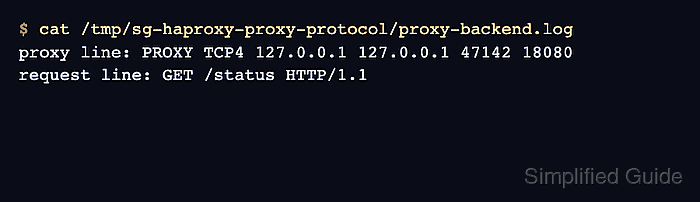
- Check the backend log or staging listener output for the PROXY line.
$ cat /tmp/sg-haproxy-proxy-protocol/proxy-backend.log
proxy line: PROXY TCP4 127.0.0.1 127.0.0.1 47142 18080
request line: GET /status HTTP/1.1
The key signal is the PROXY TCP4 or PROXY TCP6 line before the application request. A real backend log may use different labels, but it should show the advertised client and destination addresses before the request payload.
- Test the upstream-to-HAProxy path through the upstream load balancer when accept-proxy is enabled.
$ curl -sS http://edge.example.net/status
OK
Do not use a direct plain curl request to an accept-proxy listener as the success test. That request lacks the PROXY preface and should not behave like traffic coming from the configured upstream load balancer.
- Remove any temporary listener or debug endpoint used for the PROXY protocol check.
Keep the HAProxy configuration and application support in place. Remove only temporary echo listeners, diagnostic routes, or log dumps that were created to prove the first connection after the change.