How to configure HAProxy logging
HAProxy request logging needs a logger destination and proxy sections that opt in to using it. A listener can accept traffic and route to backends while no request log reaches /var/log/haproxy.log, leaving troubleshooting dependent on packet captures, backend application logs, or guesswork during an outage.
Current HAProxy configurations normally define one or more log targets in the global section, then enable those targets with log global in defaults, frontend, or listen sections. For HTTP traffic, option httplog changes sparse connection lines into request logs that include the frontend, backend/server, timing fields, status code, byte count, termination state, and request line.
The steps below use the Debian and Ubuntu package layout with /etc/haproxy/haproxy.cfg, the local syslog socket, and an rsyslog rule that writes facility local0 messages to /var/log/haproxy.log. The extra socket under /var/lib/haproxy/dev/log keeps logging working when the packaged configuration uses chroot /var/lib/haproxy; container images or service managers that collect stdout can use log stdout format raw local0 instead, but proxy sections still need log global plus option httplog for HTTP traffic or option tcplog for TCP traffic.
Steps to configure HAProxy logging:
- Create the rsyslog socket directory used by chrooted package configurations.
$ sudo mkdir -p /var/lib/haproxy/dev
If /etc/haproxy/haproxy.cfg does not contain chroot /var/lib/haproxy, this directory is harmless. If the chroot path is different, create the matching dev directory under that path instead.
- Create an rsyslog rule for HAProxy request logs.
$ sudoedit /etc/rsyslog.d/49-haproxy.conf
$AddUnixListenSocket /var/lib/haproxy/dev/log
local0.*    /var/log/haproxy.log
& stop
The first line adds a syslog socket that appears as /dev/log after HAProxy enters its /var/lib/haproxy chroot. The local0.* selector writes HAProxy traffic logs to the dedicated file, and & stop keeps those same entries from continuing through later rsyslog rules.
Use a different facility or file only when the matching log line in haproxy.cfg is changed at the same time.
- Restart rsyslog so the new rule and socket are active.
$ sudo systemctl restart rsyslog
In a container or another environment without systemd, start rsyslogd using that environment's normal service command before testing HAProxy log delivery.
- Open the active HAProxy configuration file.
$ sudoedit /etc/haproxy/haproxy.cfg
- Set the global log target and enable it for HTTP proxies.
global
    log /dev/log local0
    log /dev/log local1 notice
    chroot /var/lib/haproxy

defaults
    log global
    mode http
    option httplog
    timeout connect 5s
    timeout client 30s
    timeout server 30s
log /dev/log local0 sends request-level messages to syslog facility local0. log global tells later proxy sections to inherit the global logger, and option httplog selects the detailed HTTP request format. Use option tcplog instead for TCP frontends.
Leave option dontlognull only if idle connection probes should stay out of the log. Remove it when port scans, empty probes, or load-balancer checks are part of the evidence you need.
- Enable logging in any frontend or listen section that does not inherit the defaults section.
frontend fe_http
    bind :80
    mode http
    log global
    option httplog
    default_backend be_app
The frontend decides what gets logged for client traffic. Backend log settings are useful for server state messages, but they do not replace frontend request logging.
- Add health-check logging only when backend status transitions need extra detail.
backend be_app
    option log-health-checks
    server app1 10.0.10.11:8080 check
    server app2 10.0.10.12:8080 check
option log-health-checks records more health-check status changes. It does not log manual runtime actions such as disabling a server through the CLI, and it can add noise on large pools.
- Validate the complete HAProxy configuration before reloading.
$ sudo haproxy -c -V -f /etc/haproxy/haproxy.cfg
Configuration file is valid
Fix any reported file and line before continuing. A saved log directive is not proof that HAProxy can parse the full configuration.
- Reload HAProxy after the configuration check succeeds.
$ sudo systemctl reload haproxy
A reload applies the new logging settings without intentionally stopping the running service on package-managed systemd hosts.
Related: How to reload HAProxy gracefully
- Send one request through the logged frontend.
$ curl -sS http://127.0.0.1:8080/
logged through HAProxy
Use a URL, host header, and port that reach the HAProxy listener you changed. A direct request to the backend server does not prove that HAProxy logged the frontend transaction.
- Read the HAProxy log file and confirm the request line appears.
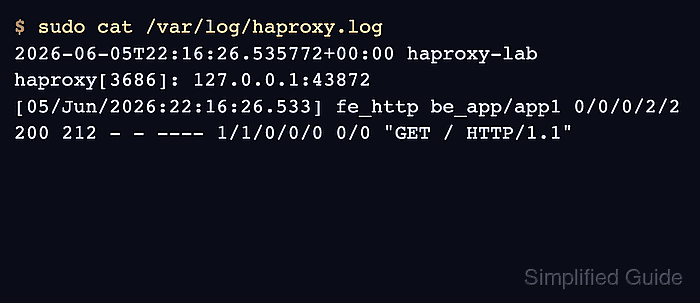
$ sudo cat /var/log/haproxy.log
2026-06-05T22:16:26.535772+00:00 haproxy-lab haproxy[3686]: 127.0.0.1:43872 [05/Jun/2026:22:16:26.533] fe_http be_app/app1 0/0/0/2/2 200 212 - - ---- 1/1/0/0/0 0/0 "GET / HTTP/1.1"
The visible proof is the frontend name fe_http, backend and server be_app/app1, status code 200, and request line “GET / HTTP/1.1” in the same entry.
- If the file is still empty, check the logging chain in order.
Check What to correct /var/lib/haproxy/dev/log is missing while HAProxy uses chroot /var/lib/haproxy Recreate the directory, keep $AddUnixListenSocket /var/lib/haproxy/dev/log in the rsyslog rule, and restart rsyslog. The frontend lacks log global or option httplog Add the missing line to the defaults or frontend/listen section that handles the request. rsyslog writes a different facility or file Match the local0 facility and /var/log/haproxy.log path between the log directive and the rsyslog selector. HAProxy runs in a container with stdout logging Use log stdout format raw local0 and inspect the container or service manager logs instead of /var/log/haproxy.log.