How to check Logstash pipeline metrics
Checking Logstash pipeline metrics shows whether a pipeline is accepting events, filtering them, sending them to outputs, or building pressure in its queue. The monitoring API is the fastest local check when ingest slows down, outputs stall, or a pipeline needs evidence before tuning.
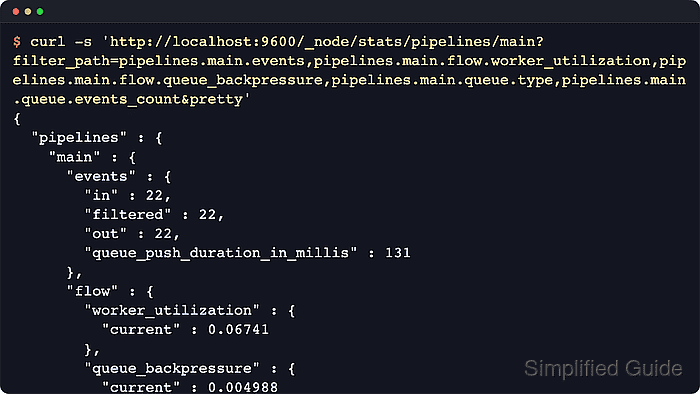
The Logstash monitoring API returns JSON for node state, configured pipelines, event counters, flow rates, queue state, and plugin-level worker cost. Saving one pipeline stats response and reading it with jq keeps the check focused while preserving the full response for a short review.
Examples assume Logstash is already running on Linux and that the monitoring API is reachable from the host. Package-based installations enable the API by default on the local interface, usually in the 9600-9700 port range, while secured deployments require the same https:// endpoint, certificate trust, and credentials used by approved monitoring clients.
Steps to check Logstash pipeline metrics:
- Check that the Logstash monitoring API is responding.
$ curl --silent --show-error 'http://localhost:9600/?pretty=true'
{
  "host" : "logstash-01",
  "version" : "9.4.2",
  "http_address" : "127.0.0.1:9600",
  "status" : "green",
  "pipeline" : {
    "workers" : 10,
    "batch_size" : 125,
    "batch_delay" : 50
  }
##### snipped #####
}
If the request fails, check api.enabled, api.http.host, and api.http.port in /etc/logstash/logstash.yml. Current settings enable the API by default and use the 9600-9700 port range, so another local Logstash process can move the endpoint away from 9600.
- List the configured pipeline IDs.
$ curl --silent --show-error 'http://localhost:9600/_node/pipelines?pretty=true'
{
  "host" : "logstash-01",
  "version" : "9.4.2",
  "http_address" : "127.0.0.1:9600",
  "status" : "green",
  "pipelines" : {
    "main" : {
      "workers" : 10,
      "batch_size" : 125,
      "batch_delay" : 50,
      "dead_letter_queue_enabled" : false
    }
  }
##### snipped #####
}
Use the pipeline ID shown under pipelines in later commands. The default pipeline ID is main unless a different ID is set in /etc/logstash/pipelines.yml or on the command line.
- Save the stats document for one pipeline.
$ curl --silent --show-error --output logstash-main-pipeline-stats.json 'http://localhost:9600/_node/stats/pipelines/main'
Replace main with the pipeline ID from the previous step. The saved file contains event counters, flow metrics, queue state, reload state, and plugin details for that pipeline.
- Check the event counters.
$ jq '.pipelines.main.events' logstash-main-pipeline-stats.json { "in": 10526691, "filtered": 10525882, "out": 10525882, "queue_push_duration_in_millis": 35173, "duration_in_millis": 44977 }events.in, filtered, and out should keep moving together on a pipeline that is draining normally. A widening gap between in and out points to events waiting in filters, outputs, or the queue.
- Check the flow and queue metrics.
$ jq '.pipelines.main | {flow, queue}' logstash-main-pipeline-stats.json
{
  "flow": {
    "worker_concurrency": {
      "current": 0.4437,
      "last_1_minute": 0.4527,
      "lifetime": 0.4839
    },
    "queue_backpressure": {
      "current": 0.3392,
      "last_1_minute": 0.3729,
      "lifetime": 0.3784
    },
    "output_throughput": {
      "current": 121100.0,
      "last_1_minute": 115900.0,
      "lifetime": 113200.0
    },
    "filter_throughput": {
      "current": 121100.0,
      "last_1_minute": 115900.0,
      "lifetime": 113200.0
    },
    "worker_utilization": {
      "current": 4.436,
      "last_1_minute": 4.527,
      "lifetime": 4.839
    },
    "input_throughput": {
      "current": 121100.0,
      "last_1_minute": 116000.0,
      "lifetime": 113200.0
    }
  },
  "queue": {
    "type": "memory",
    "events_count": 0,
    "queue_size_in_bytes": 0,
    "max_queue_size_in_bytes": 0
  }
}
worker_utilization near 100 means the pipeline workers are staying busy. Sustained queue_backpressure means inputs are spending measurable time blocked by the queue. On persistent queues, rising queue event or byte counts mean the queue is growing faster than it drains.
- Check filter plugin worker cost.
$ jq '.pipelines.main.plugins.filters[] | {name, flow}' logstash-main-pipeline-stats.json
{
  "name": "mutate",
  "flow": {
    "worker_millis_per_event": {
      "current": 0.001491,
      "last_1_minute": 0.0016,
      "lifetime": 0.001755
    },
    "worker_utilization": {
      "current": 1.806,
      "last_1_minute": 1.855,
      "lifetime": 1.988
    }
  }
}
A filter with much higher worker_utilization or worker_millis_per_event than its neighbors is a likely place to inspect parsing, enrichment, or conditional logic.
Related: How to debug Logstash pipelines
- Check output plugin worker cost.
$ jq '.pipelines.main.plugins.outputs[] | {name, flow}' logstash-main-pipeline-stats.json
{
  "name": "file",
  "flow": {
    "worker_millis_per_event": {
      "current": 0.002057,
      "last_1_minute": 0.002173,
      "lifetime": 0.002379
    },
    "worker_utilization": {
      "current": 2.49,
      "last_1_minute": 2.52,
      "lifetime": 2.694
    }
  }
}
Output plugins often expose downstream pressure first because they wait on files, networks, brokers, or Elasticsearch. A single output with high worker cost deserves review before increasing pipeline.workers.
- Confirm the monitoring API listener is not exposed more broadly than intended.
$ sudo ss --listening --numeric --tcp --processes
State  Recv-Q Send-Q Local Address:Port Peer Address:Port Process
LISTEN 0      4096   127.0.0.1:9600    0.0.0.0:*    users:(("java",pid=22164,fd=135))
##### snipped #####
The monitoring API can expose pipeline names, plugin names, queue state, reload state, and performance metrics. Binding it to 0.0.0.0 or a routable address should be paired with TLS, authentication, and network filtering.
- Remove the saved stats document when the check is complete.
$ rm logstash-main-pipeline-stats.json