How to configure shard allocation awareness in Elasticsearch
Shard allocation awareness tells Elasticsearch to place primary and replica shard copies across different racks, zones, or other failure domains. It is useful on self-managed clusters where data nodes span multiple locations and a single location failure should not remove every copy of the same shard.
Each shard-holding node must advertise the same custom attribute name, such as node.attr.zone, with a value that identifies its location. Elasticsearch reads that node attribute at startup, and the dynamic awareness-attributes setting tells the allocator to consider that attribute when assigning or relocating shards.
Use persistent cluster settings for routine awareness changes because they survive restarts and apply consistently across the cluster. Forced awareness can leave replicas unassigned when a planned location is missing instead of crowding them into the surviving location, and shard awareness still needs a separate master-eligible node layout that can keep quorum during a zone outage.
Steps to configure shard allocation awareness in Elasticsearch:
- Decide the awareness attribute name and every planned location value.
Common attribute names are zone and rack_id. Every data node that can hold shards needs one value for the selected attribute, and replica placement only matters for indices with at least one replica.
- Set the node attribute in /etc/elasticsearch/elasticsearch.yml on each shard-holding node.
node.attr.zone: az1
Use the value that matches that node's fault domain, such as az1 on one group of nodes and az2 on another. Keep the attribute name identical on every shard-holding node.
- Restart each affected Elasticsearch node one at a time so the node attribute is loaded.
$ sudo systemctl restart elasticsearch.service
Use a rolling restart in production. Restarting multiple shard-holding nodes at once can reduce availability and trigger heavy recovery work.
- Confirm that each shard-holding node reports the awareness attribute.
$ curl -sS \
  "http://localhost:9200/_nodes?filter_path=nodes.*.name,nodes.*.attributes.zone&pretty"
{
  "nodes" : {
    "V1E9pOAgQ76-bsfEQDInTw" : {
      "name" : "es-aware-1",
      "attributes" : {
        "zone" : "az1"
      }
    },
    "tXVKsooISFG0XliQWztZWA" : {
      "name" : "es-aware-2",
      "attributes" : {
        "zone" : "az2"
      }
    }
  }
}
Switch the endpoint to https:// and add authentication options such as --user or an Authorization header when cluster security is enabled.
- Enable awareness for the selected attribute and planned values.
$ curl -sS -H "Content-Type: application/json" -X PUT \
  "http://localhost:9200/_cluster/settings?pretty" -d '{
  "persistent": {
    "cluster.routing.allocation.awareness.attributes": "zone",
    "cluster.routing.allocation.awareness.force.zone.values": "az1,az2"
  }
}'
{
  "acknowledged" : true,
  "persistent" : {
    "cluster" : {
      "routing" : {
        "allocation" : {
          "awareness" : {
            "attributes" : "zone",
            "force" : {
              "zone" : {
                "values" : "az1,az2"
              }
            }
          }
        }
      }
    }
  },
  "transient" : { }
}
Remove the forced-awareness values line from the JSON when replicas should relocate into surviving locations after a location outage. Use a credential with cluster manage privilege on secured clusters.
Related: How to update cluster settings in Elasticsearch - Verify that the persistent awareness settings are stored.
$ curl -sS \ "http://localhost:9200/_cluster/settings?flat_settings=true&filter_path=persistent.*awareness*&pretty" { "persistent" : { "cluster.routing.allocation.awareness.attributes" : "zone", "cluster.routing.allocation.awareness.force.zone.values" : "az1,az2" } } - Create a temporary index with one replica for the placement check.
$ curl -sS -H "Content-Type: application/json" -X PUT \
  "http://localhost:9200/sg-awareness-check?pretty" -d '{
  "settings": {
    "number_of_shards": 2,
    "number_of_replicas": 1
  }
}'
{
  "acknowledged" : true,
  "shards_acknowledged" : true,
  "index" : "sg-awareness-check"
}
Use a temporary index name that does not match production index templates or lifecycle policies if those templates would change the shard or replica count.
- Wait for the temporary index to reach green health when all planned values are present.
$ curl -sS \
  "http://localhost:9200/_cluster/health/sg-awareness-check?wait_for_status=green&timeout=60s&pretty"
{
  "cluster_name" : "sg-awareness",
  "status" : "green",
  "timed_out" : false,
  "number_of_nodes" : 2,
  "number_of_data_nodes" : 2,
  "active_primary_shards" : 2,
  "active_shards" : 4,
  "relocating_shards" : 0,
  "initializing_shards" : 0,
  "unassigned_shards" : 0,
  "unassigned_primary_shards" : 0,
  "delayed_unassigned_shards" : 0,
  "number_of_pending_tasks" : 3,
  "number_of_in_flight_fetch" : 0,
  "task_max_waiting_in_queue_millis" : 0,
  "active_shards_percent_as_number" : 100.0
}
If forced awareness is enabled and one planned location is missing, replica shards can stay UNASSIGNED and the index can remain yellow until nodes from the missing location return.
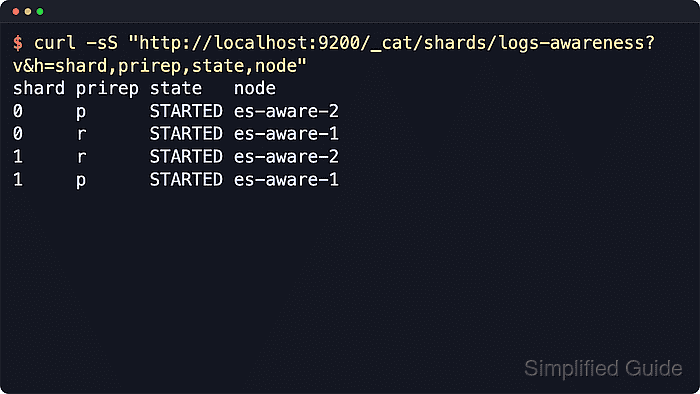
- Confirm that each primary and replica pair is split across nodes in different locations.
$ curl -sS \
  "http://localhost:9200/_cat/shards/sg-awareness-check?v&h=index,shard,prirep,state,node&s=shard,prirep"
index              shard prirep state   node
sg-awareness-check 0     p      STARTED es-aware-1
sg-awareness-check 0     r      STARTED es-aware-2
sg-awareness-check 1     p      STARTED es-aware-2
sg-awareness-check 1     r      STARTED es-aware-1
Compare the node names with the earlier _nodes output. If a replica stays unassigned or does not move as expected, inspect the allocation decider output before changing more settings.
Related: How to explain shard allocation decisions in Elasticsearch - Delete the temporary verification index.
$ curl -sS -X DELETE "http://localhost:9200/sg-awareness-check?pretty"
{
  "acknowledged" : true
}