How to check TXT records with dig
DNS text records carry ownership tokens, mail policy, signing keys, and other service data at specific owner names. A dig lookup exposes the strings returned by the active resolver, making it possible to distinguish a published TXT value from a missing name or a query aimed at the wrong label.
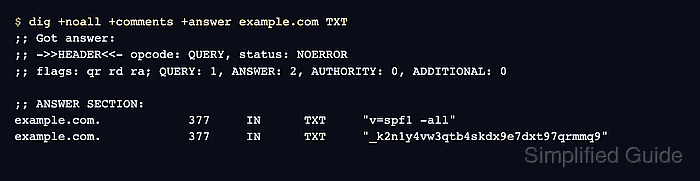
The normal answer view includes the response status, answer count, owner name, remaining cache lifetime, and quoted record data. +short is useful after that context is known, but it hides the status that separates an empty answer from NXDOMAIN.
Ask for the exact owner name supplied by the service. A root-domain policy at example.com, a DMARC policy at _dmarc.example.com, and a DKIM key below selector._domainkey.example.com are separate DNS questions even when they belong to the same domain.
Related: How to query DNS records with dig
Related: How to show short DNS answers with dig
Related: How to compare DNS answers across resolvers with dig
Tool: DNS Record Lookup
Steps to check TXT records with dig:
- Query the exact owner name for TXT records while retaining the response header.
$ dig +noall +comments +answer example.com TXT
;; Got answer:
;; ->>HEADER<<- opcode: QUERY, status: NOERROR, id: 13688
;; flags: qr rd ra; QUERY: 1, ANSWER: 2, AUTHORITY: 0, ADDITIONAL: 0

;; ANSWER SECTION:
example.com.		377	IN	TXT	"v=spf1 -all"
example.com.		377	IN	TXT	"_k2n1y4vw3qtb4skdx9e7dxt97qrmmq9"
The answer fields are owner name, TTL in seconds, class, record type, and quoted text. TTL values can decrease between checks because recursive resolvers cache responses.
- Confirm that status: NOERROR appears and the ANSWER count matches the returned TXT rows.
NOERROR with ANSWER: 0 means no record of the requested type was returned for that name. NXDOMAIN means the queried owner name does not exist from the resolver's view.
- Query a service-specific owner name instead of assuming its TXT record belongs at the base domain.
$ dig +noall +comments +answer _dmarc.google.com TXT
;; Got answer:
;; ->>HEADER<<- opcode: QUERY, status: NOERROR, id: 3833
;; flags: qr rd ra; QUERY: 1, ANSWER: 1, AUTHORITY: 0, ADDITIONAL: 0

;; ANSWER SECTION:
_dmarc.google.com.	377	IN	TXT	"v=DMARC1; p=reject; rua=mailto:mailauth-reports@google.com"
DMARC uses the _dmarc label. DKIM usually uses a provider-selected label below ._domainkey.
- Combine adjacent quoted character strings from the same answer row without inserting spaces.
A single TXT record can contain multiple strings, while separate answer rows remain separate records. This distinction matters when reading long SPF or DKIM values.
- Print the compact TXT value after the full response confirms a successful answer.
$ dig +short _dmarc.google.com TXT
"v=DMARC1; p=reject; rua=mailto:mailauth-reports@google.com"
+short removes the response status, answer count, owner name, TTL, class, and record type.
Related: How to show short DNS answers with dig