How to query a specific DNS server with dig

DNS answers can differ by resolver cache, forwarding policy, authoritative server, and network path. The dig @server argument sends one lookup to the DNS server named on the command line, which keeps the response tied to that server instead of the workstation's default resolver.

The server can be an IPv4 address, an IPv6 address, or a DNS hostname. When the server is omitted, dig uses /etc/resolv.conf and the response may come from whichever resolver the operating system is configured to use.

Use the SERVER line, DNS status value, answer count, and answer rows together. For recursive resolvers, the response usually includes the ra flag when recursion is available. For authoritative zone checks, add +norecurse so the selected server does not hide authority problems by chasing the answer elsewhere.

Steps to query a specific DNS server with dig:

  1. Choose the DNS server, record name, and record type.
    server: 1.1.1.1
    name: example.com
    type: A

    Keep the name and type unchanged while testing a server. Change only the @server value when the job is to compare resolver behavior.

  2. Query the chosen server with dig.
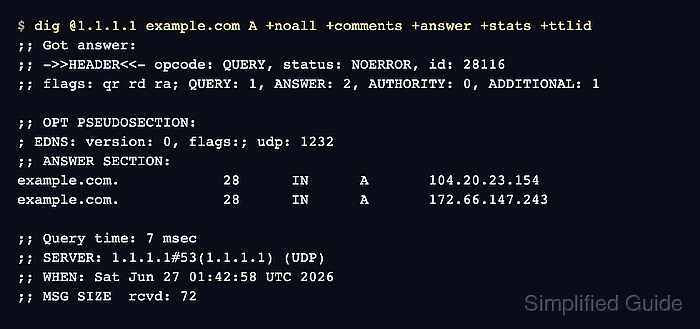
    $ dig @1.1.1.1 example.com A +noall +comments +answer +stats +ttlid
    ;; Got answer:
    ;; ->>HEADER<<- opcode: QUERY, status: NOERROR, id: 28116
    ;; flags: qr rd ra; QUERY: 1, ANSWER: 2, AUTHORITY: 0, ADDITIONAL: 1
    
    ;; OPT PSEUDOSECTION:
    ; EDNS: version: 0, flags:; udp: 1232
    ;; ANSWER SECTION:
    example.com.		28	IN	A	104.20.23.154
    example.com.		28	IN	A	172.66.147.243
    
    ;; Query time: 7 msec
    ;; SERVER: 1.1.1.1#53(1.1.1.1) (UDP)
    ;; WHEN: Sat Jun 27 01:42:58 UTC 2026
    ;; MSG SIZE  rcvd: 72

    +noall hides default sections first. +comments, +answer, +stats, and +ttlid restore the header status, answer rows, server line, and TTL values needed for a resolver-specific check.

  3. Confirm the response came from the intended DNS server.

    The SERVER line should show the selected address and port, such as 1.1.1.1#53. If the line names a different address, check the @server value, DNS server hostname resolution, or any local wrapper that changed the command.

  4. Read the DNS status before treating the answer rows as success.

    NOERROR with ANSWER: 2 means the selected server returned two answer rows for this question. NOERROR with ANSWER: 0 means the name exists from that server's view but not for the requested type. NXDOMAIN, SERVFAIL, and REFUSED belong to the selected server's response path.

  5. Query an authoritative server with recursion disabled when testing zone authority.
    $ dig @a.iana-servers.net iana.org SOA +norecurse +noall +comments +answer +stats
    ;; Got answer:
    ;; ->>HEADER<<- opcode: QUERY, status: NOERROR, id: 7137
    ;; flags: qr aa; QUERY: 1, ANSWER: 1, AUTHORITY: 0, ADDITIONAL: 1
    
    ;; OPT PSEUDOSECTION:
    ; EDNS: version: 0, flags:; udp: 4096
    ;; ANSWER SECTION:
    iana.org.		3600	IN	SOA	sns.dns.icann.org. noc.dns.icann.org. 2026062320 7200 3600 1209600 3600
    
    ;; Query time: 200 msec
    ;; SERVER: 199.43.135.53#53(a.iana-servers.net) (UDP)
    ;; WHEN: Sat Jun 27 01:42:58 UTC 2026
    ;; MSG SIZE  rcvd: 91

    The aa flag shows an authoritative answer from the selected server. If aa is missing for a zone that server should host, check the delegation, zone load state, or server name before editing records.
    Related: How to find authoritative nameservers with dig

  6. Use a port option only when the selected DNS server does not listen on port 53.
    $ dig @1.1.1.1 example.com A -p 53 +noall +comments +stats
    ;; Got answer:
    ;; ->>HEADER<<- opcode: QUERY, status: NOERROR, id: 6315
    ;; flags: qr rd ra; QUERY: 1, ANSWER: 2, AUTHORITY: 0, ADDITIONAL: 1
    
    ;; OPT PSEUDOSECTION:
    ; EDNS: version: 0, flags:; udp: 1232
    ;; Query time: 8 msec
    ;; SERVER: 1.1.1.1#53(1.1.1.1) (UDP)
    ;; WHEN: Sat Jun 27 01:42:58 UTC 2026
    ;; MSG SIZE  rcvd: 72

    Replace 53 with the custom listener port, such as 5353, only when the DNS service is configured that way. A normal public or authoritative DNS server usually listens on UDP and TCP port 53.