How to check MX records with dig
Inbound mail routing depends on DNS before an SMTP connection begins. A domain's MX records name the hosts that receive its mail and expose the preference values senders use when choosing which destination to try first.
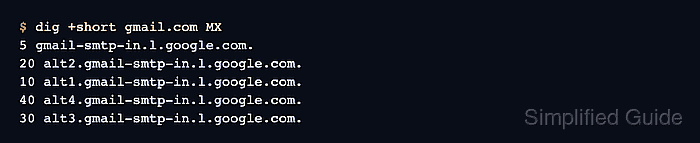
Each MX answer pairs a numeric preference with an exchange hostname. Lower values are preferred over higher values, while equal values identify peer destinations whose printed order does not establish a fixed delivery order.
An empty MX set is different from both a Null MX declaration and a nonexistent name. Empty data can trigger the SMTP implicit-address fallback, MX 0 . explicitly declares no inbound mail service, and NXDOMAIN means the queried name does not exist. DNS proves the route only; it does not test port 25, STARTTLS, provider provisioning, or mailbox acceptance.
Related: How to query DNS records with dig
Related: How to show short DNS answers with dig
Related: How to compare DNS answers across resolvers with dig
Tool: MX Record Lookup
Steps to check MX records with dig:
- Query iana.org with the DNS status and MX answers visible.
$ dig iana.org MX +noall +comments +answer
;; Got answer:
;; ->>HEADER<<- opcode: QUERY, status: NOERROR, id: 24276
;; flags: qr rd ra; QUERY: 1, ANSWER: 4, AUTHORITY: 0, ADDITIONAL: 0

;; ANSWER SECTION:
iana.org.        3649    IN      MX      10 pechora1.icann.org.
iana.org.        3649    IN      MX      10 pechora6.icann.org.
iana.org.        3649    IN      MX      10 pechora7.icann.org.
iana.org.        3649    IN      MX      10 pechora8.icann.org.
NOERROR reports a successful DNS response, while ANSWER: 4 and the four rows confirm a populated MX set.
- Identify the exchange hosts with the lowest preference value.
All four hosts have preference 10, so an SMTP sender treats them as peers and randomizes among them unless another reachability reason favors one host.
- Resolve one listed exchange host to an IPv4 address.
$ dig pechora1.icann.org A +noall +answer
pechora1.icann.org.     4502    IN      A       192.0.33.71
An A or AAAA answer satisfies the DNS address requirement for that exchange host but does not prove SMTP service reachability.
- Query example.com to identify its Null MX declaration.
$ dig example.com MX +noall +comments +answer
;; Got answer:
;; ->>HEADER<<- opcode: QUERY, status: NOERROR, id: 7379
;; flags: qr rd ra; QUERY: 1, ANSWER: 1, AUTHORITY: 0, ADDITIONAL: 0

;; ANSWER SECTION:
example.com.     315     IN      MX      0 .
A single exchange of . with preference 0 declares that the domain accepts no inbound mail. A Null MX record must not coexist with ordinary MX records.
- Inspect MX no-data for the existing www.example.com name.
$ dig www.example.com MX +noall +comments +question +answer +authority
;; Got answer:
;; ->>HEADER<<- opcode: QUERY, status: NOERROR, id: 38731
;; flags: qr rd ra; QUERY: 1, ANSWER: 0, AUTHORITY: 0, ADDITIONAL: 0

;; QUESTION SECTION:
;www.example.com.       IN      MX
NOERROR with ANSWER: 0 means no MX data was returned. This is not Null MX; SMTP can treat the same name as an implicit preference-0 exchanger when its MX set is empty.
- Distinguish a nonexistent name by its NXDOMAIN status.
$ dig no-such-name.invalid MX +noall +comments +question +answer +authority
;; Got answer:
;; ->>HEADER<<- opcode: QUERY, status: NXDOMAIN, id: 44210
;; flags: qr rd ra; QUERY: 1, ANSWER: 0, AUTHORITY: 0, ADDITIONAL: 0

;; QUESTION SECTION:
;no-such-name.invalid.  IN      MX
NXDOMAIN means the queried name itself does not exist, unlike the NOERROR response for an existing name with no MX data.
- Print the populated iana.org mail routes in compact form.
$ dig iana.org MX +short
10 pechora1.icann.org.
10 pechora6.icann.org.
10 pechora7.icann.org.
10 pechora8.icann.org.
Each line contains a preference and exchange hostname, confirming that the domain publishes usable MX routing data.