How to verify a DNS change with dig
DNS changes become visible in two stages: authoritative nameservers publish the zone data, then recursive resolvers replace cached copies when their TTLs expire. Checking both stages separates an incomplete provider update from a resolver that still holds the earlier record.
Direct queries to every authoritative server should return NOERROR, the aa flag, and the complete expected record set. Record order is not significant, but a missing or extra value means the authoritative side has not converged.
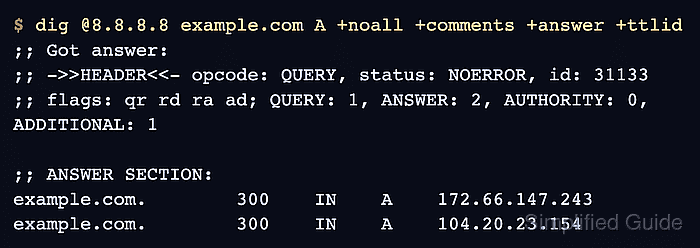
Recursive answers can carry lower and different TTLs because each resolver counts down its own cached copy. Agreement across selected resolvers confirms those client paths now return the intended data, but private resolvers, split DNS, and location-aware answers may still need checks from the affected network.
Steps to verify a DNS change with dig:
- Document one changed DNS question with its expected record set.
Hostname: example.com
Record type: A
Expected records:
104.20.23.154
172.66.147.243
The sample represents one hostname, one record type, and the complete provider-published set. Multi-value answers are compared as a set.
- List the authoritative nameservers for the changed zone apex.
$ dig example.com NS +noall +answer
example.com.        4502    IN    NS    hera.ns.cloudflare.com.
example.com.        4502    IN    NS    elliott.ns.cloudflare.com.
A host below the zone still uses the zone apex for this NS query.
Related: How to find authoritative nameservers with dig - Query the first authoritative server for the changed record without recursion.
$ dig @hera.ns.cloudflare.com example.com A +norecurse +noall +comments +answer +ttlid
;; Got answer:
;; ->>HEADER<<- opcode: QUERY, status: NOERROR, id: 2527
;; flags: qr aa; QUERY: 1, ANSWER: 2, AUTHORITY: 0, ADDITIONAL: 1

;; OPT PSEUDOSECTION:
; EDNS: version: 0, flags:; udp: 1232
;; ANSWER SECTION:
example.com.        300    IN    A    172.66.147.243
example.com.        300    IN    A    104.20.23.154
+norecurse clears the recursion-desired bit. The aa flag identifies an authoritative response.
- Query the second authoritative server with the identical record question.
$ dig @elliott.ns.cloudflare.com example.com A +norecurse +noall +comments +answer +ttlid
;; Got answer:
;; ->>HEADER<<- opcode: QUERY, status: NOERROR, id: 59619
;; flags: qr aa; QUERY: 1, ANSWER: 2, AUTHORITY: 0, ADDITIONAL: 1

;; OPT PSEUDOSECTION:
; EDNS: version: 0, flags:; udp: 1232
;; ANSWER SECTION:
example.com.        300    IN    A    104.20.23.154
example.com.        300    IN    A    172.66.147.243
- Confirm every authoritative response contains NOERROR, aa, and the complete expected record set.
Different data, a different status, or an absent aa flag leaves authority convergence unresolved; resolver waiting cannot repair inconsistent authority data.
- Query Cloudflare 1.1.1.1 for the same record.
$ dig @1.1.1.1 example.com A +noall +comments +answer +ttlid
;; Got answer:
;; ->>HEADER<<- opcode: QUERY, status: NOERROR, id: 33010
;; flags: qr rd ra; QUERY: 1, ANSWER: 2, AUTHORITY: 0, ADDITIONAL: 1

;; OPT PSEUDOSECTION:
; EDNS: version: 0, flags:; udp: 1232
;; ANSWER SECTION:
example.com.        128    IN    A    172.66.147.243
example.com.        128    IN    A    104.20.23.154
- Query Google Public DNS 8.8.8.8 with the unchanged question.
$ dig @8.8.8.8 example.com A +noall +comments +answer +ttlid
;; Got answer:
;; ->>HEADER<<- opcode: QUERY, status: NOERROR, id: 31133
;; flags: qr rd ra ad; QUERY: 1, ANSWER: 2, AUTHORITY: 0, ADDITIONAL: 1

;; OPT PSEUDOSECTION:
; EDNS: version: 0, flags:; udp: 512
;; ANSWER SECTION:
example.com.        300    IN    A    172.66.147.243
example.com.        300    IN    A    104.20.23.154
- Confirm every selected recursive resolver returns NOERROR and the complete expected record set.
The observed TTLs of 128 and 300 seconds differ because the resolvers refreshed their caches at different times; matching data matters more than matching TTLs. A resolver that still returns the old record may keep it until the displayed TTL reaches zero, and serve-stale policy can extend that window during an authority outage.
Related: How to compare DNS answers across resolvers with dig
Tool: DNS Propagation Checker