How to control Expect: 100-continue handling in cURL
Large uploads can stall or waste bandwidth when an API, proxy, or object store rejects the request after curl has already started sending the body. Expect: 100-continue gives an HTTP/1.1 server a chance to approve or reject the request headers before the upload body moves.
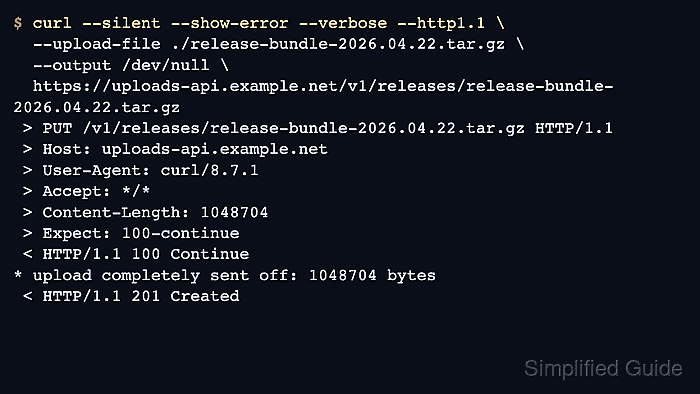
curl adds Expect: 100-continue automatically for PUT uploads and for POST bodies known or suspected to be larger than one megabyte. An empty Expect: header removes the handshake, an explicit Expect: 100-continue header forces it on smaller bodies, and --expect100-timeout changes how long curl waits for the provisional response.
The setting matters only for HTTP/1.1. Keep the header when early rejection can avoid sending a large body, remove it when a broken gateway turns the provisional response into a needless pause, and shorten the timeout when the server eventually answers but curl's default one-second wait is longer than the upload path can tolerate.
Related: How to use HTTP/2 in cURL
Related: How to use HTTP/3 with cURL
Tool: cURL Command Generator
Steps to control Expect: 100-continue handling in cURL:
- Run a verbose HTTP/1.1 upload and confirm that curl adds Expect: 100-continue.
$ curl --silent --show-error --verbose --http1.1 \
  --upload-file ./release-bundle-2026.04.22.tar.gz \
  --output /dev/null \
  "https://uploads-api.example.net/v1/releases/release-bundle-2026.04.22.tar.gz"
##### snipped #####
> PUT /v1/releases/release-bundle-2026.04.22.tar.gz HTTP/1.1
> Host: uploads-api.example.net
> User-Agent: curl/8.x
> Accept: */*
> Content-Length: 1048704
> Expect: 100-continue
>
< HTTP/1.1 100 Continue
* upload completely sent off: 1048704 bytes
< HTTP/1.1 201 Created
In verbose output, > lines are request headers sent by curl, < lines are server responses, and the blank > line ends the request-header block.
Related: How to upload files with cURL
Related: How to view HTTP request headers with cURL - Remove the handshake with an empty Expect: header when the upstream accepts immediate body transmission more consistently.
$ curl --silent --show-error --verbose --http1.1 \
  --header "Expect:" \
  --upload-file ./release-bundle-2026.04.22.tar.gz \
  --output /dev/null \
  "https://uploads-api.example.net/v1/releases/release-bundle-2026.04.22.tar.gz"
##### snipped #####
> PUT /v1/releases/release-bundle-2026.04.22.tar.gz HTTP/1.1
> Host: uploads-api.example.net
> User-Agent: curl/8.x
> Accept: */*
> Content-Length: 1048704
>
* upload completely sent off: 1048704 bytes
< HTTP/1.1 201 Created
Removing Expect: means an authentication failure, quota failure, or object-policy rejection can still receive the full request body before the failure is visible.
- Force the provisional check on a small request body when the server should approve the headers before reading the payload.
$ curl --silent --show-error --verbose --http1.1 \
  --header "Expect: 100-continue" \
  --header "Content-Type: application/json" \
  --data-binary @./release-bundle-2026.04.22.json \
  --output /dev/null \
  "https://uploads-api.example.net/v1/releases/release-bundle-2026.04.22/metadata"
##### snipped #####
> POST /v1/releases/release-bundle-2026.04.22/metadata HTTP/1.1
> Host: uploads-api.example.net
> User-Agent: curl/8.x
> Accept: */*
> Expect: 100-continue
> Content-Type: application/json
> Content-Length: 72
>
< HTTP/1.1 100 Continue
* upload completely sent off: 72 bytes
< HTTP/1.1 201 Created
Setting the header explicitly applies the same approval step to small request bodies that curl would otherwise send immediately.
Related: Send data in HTTP requests with cURL
- Shorten the wait with --expect100-timeout when delayed provisional responses should not hold the body for the full default pause.
$ curl --silent --show-error --verbose --http1.1 \
  --expect100-timeout 0.2 \
  --upload-file ./release-bundle-2026.04.22.tar.gz \
  --output /dev/null \
  "https://uploads-api.example.net/v1/releases/release-bundle-2026.04.22.tar.gz"
##### snipped #####
> PUT /v1/releases/release-bundle-2026.04.22.tar.gz HTTP/1.1
> Host: uploads-api.example.net
> User-Agent: curl/8.x
> Accept: */*
> Content-Length: 1048704
> Expect: 100-continue
>
* Done waiting for 100-continue
* upload completely sent off: 1048704 bytes
< HTTP/1.1 100 Continue
< HTTP/1.1 201 Created
--expect100-timeout uses seconds, accepts decimal values with a dot, and falls back to sending the body when the timer expires. The default wait is one second.