How to change PHP version in cPanel
cPanel hosting allows users to configure the PHP version used for their server. Changing the PHP version can help optimize performance and ensure compatibility with specific applications. In cPanel, multiple PHP versions are available, and users can switch between them directly from the dashboard.
Switching PHP versions is a straightforward process that can be done from the Software section in cPanel. This section provides access to various PHP versions, and users can quickly select the version they prefer. The choice of PHP version may depend on the application's requirements or desired server configurations.
Before switching, it is important to verify that the application is compatible with the PHP version you plan to use. Updating to an unsupported version can lead to issues or malfunction in the application. Therefore, compatibility testing is advised to prevent any disruptions.
Steps to update PHP version in cPanel:
- Login to your cPanel account.
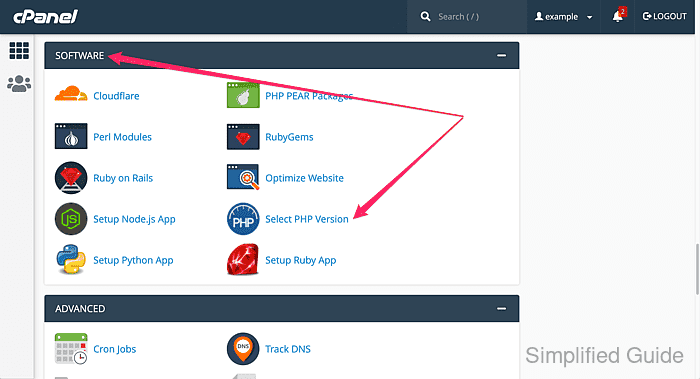
- Go to the Software section and click on Select PHP Version.
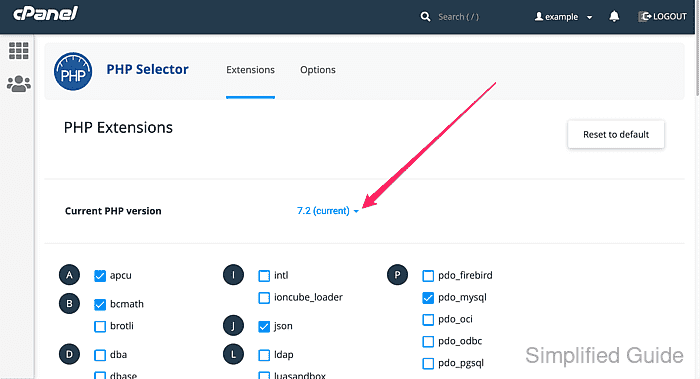
- Open the dropdown menu under Current PHP version.
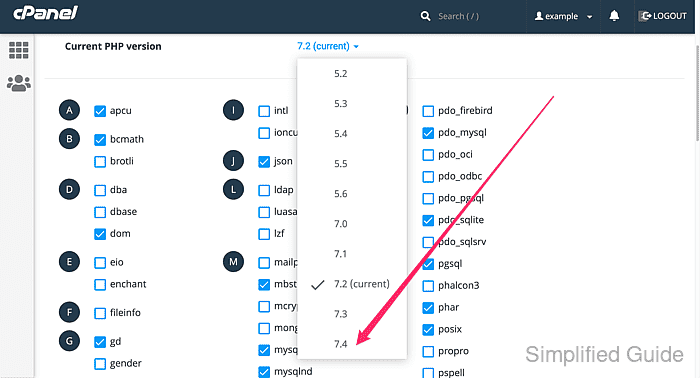
- Select the PHP version you want to switch to.
- Click Set as current to apply the changes.
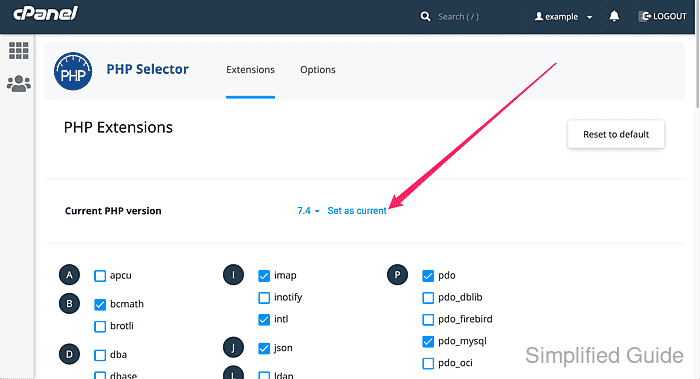
- Check your current PHP version to confirm the update.
Related: How to check PHP version