How to manage Ceph services with cephadm
Cephadm manages cluster daemons through the Ceph orchestrator instead of direct container or systemd edits on each host. Service changes are declarative, so the manager keeps reconciling the requested placement, container image, configuration, and daemon count until the running cluster matches the service specification.
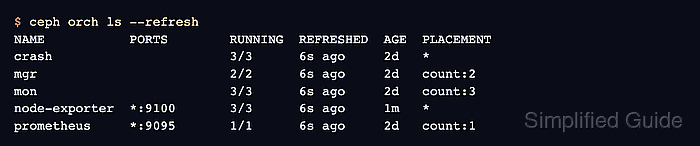
The orchestrator separates a service from its daemon instances. ceph orch ls shows service-level state such as mon, mgr, rgw.realm.zone, or node-exporter, while ceph orch ps shows the individual daemons placed on hosts such as ceph-node1 and ceph-node2.
Run service changes from an administration shell that already has Ceph admin credentials, and refresh orchestrator output when checking the result. Removing or redeploying a service can interrupt the workload behind that service, and force-delete options can remove daemon data from hosts instead of moving it aside.
Steps to manage Ceph services with cephadm:
- Check the cluster health before changing services.
$ ceph -s
  cluster:
    id:     00000000-1111-2222-3333-444444444444
    health: HEALTH_OK

  services:
    mon: 3 daemons, quorum ceph-node1,ceph-node2,ceph-node3 (age 2h)
    mgr: ceph-node1.active (active, since 2h), standbys: ceph-node2
##### snipped #####
Use cephadm shell -- ceph -s when the admin keyring is not installed on the current host. Resolve active HEALTH_ERR conditions before changing service placement for normal maintenance.
Related: How to check Ceph cluster health - List orchestrator services with refreshed state.
$ ceph orch ls --refresh
NAME           PORTS        RUNNING  REFRESHED  AGE  PLACEMENT
crash                       3/3      6s ago     2d   *
mgr                         2/2      6s ago     2d   count:2
mon                         3/3      6s ago     2d   count:3
node-exporter  *:9100       3/3      6s ago     1m   *
prometheus     *:9095       1/1      6s ago     2d   count:1
Ceph caches orchestrator daemon state. The --refresh option asks the manager to update the displayed state before returning the table.
- Inspect the daemon instances for the target service.
$ ceph orch ps --service_name node-exporter --refresh
NAME                      HOST        PORTS   STATUS         REFRESHED  AGE
node-exporter.ceph-admin  ceph-admin  *:9100  running (2d)   5s ago     2d
node-exporter.ceph-node1  ceph-node1  *:9100  running (2d)   5s ago     2d
node-exporter.ceph-node2  ceph-node2  *:9100  running (2d)   5s ago     2d
Use the service name exactly as it appears in ceph orch ls. Services with IDs include the ID in the service name, such as rgw.production.us-east or mds.cephfs.
- Save the intended service specification.
- node-exporter.yaml
service_type: node-exporter
placement:
  host_pattern: "*"
unmanaged: false
The node-exporter service is a lightweight monitoring example used by cephadm. Replace the service type, service ID, placement, and service-specific options when managing RGW, MDS, NFS, rbd-mirror, or another daemon type.
- Preview the service specification.
$ ceph orch apply -i node-exporter.yaml --dry-run
SERVICE        ADD_TO                              REMOVE_FROM
node-exporter  ceph-admin, ceph-node1, ceph-node2  -
The dry run shows placement intent without changing the cluster. A preview that removes unexpected hosts means the placement pattern or labels need correction before applying the spec.
- Apply the service specification.
$ ceph orch apply -i node-exporter.yaml
Scheduled node-exporter update
Cephadm reconciles the service asynchronously. A scheduled update means the manager accepted the spec; daemon placement still needs a follow-up check.
- Verify the service row after the apply operation.
$ ceph orch ls --service_name node-exporter --refresh
NAME           PORTS   RUNNING  REFRESHED  AGE  PLACEMENT
node-exporter  *:9100  3/3      4s ago     1m   *
The RUNNING count should match the intended placement. If it does not, inspect host labels, unavailable hosts, and recent cephadm health warnings.
- Redeploy the service when the running daemons need a fresh container or generated configuration.
$ ceph orch redeploy node-exporter
Scheduled node-exporter update
Use redeploy after changing a service image, template, or daemon-level configuration that requires container recreation. Do not redeploy critical services during an unrelated health incident.
- Check the daemon state after redeployment.
$ ceph orch ps --service_name node-exporter --refresh
NAME                      HOST        PORTS   STATUS          REFRESHED  AGE
node-exporter.ceph-admin  ceph-admin  *:9100  running (20s)   4s ago     20s
node-exporter.ceph-node1  ceph-node1  *:9100  running (18s)   4s ago     18s
node-exporter.ceph-node2  ceph-node2  *:9100  running (17s)   4s ago     17s
Recent running ages on the selected service show that the daemon containers were recreated after the redeploy request.
- Remove the service only when it is temporary or intentionally retired.
$ ceph orch rm node-exporter
Removed service node-exporter
Do not remove core or production services as a generic cleanup step. The --force-delete-data option requires --force and can delete daemon data for supported daemon types instead of moving it under the host's removed-data directory.
- List services after removal.
$ ceph orch ls --refresh
NAME        PORTS   RUNNING  REFRESHED  AGE  PLACEMENT
crash               3/3      5s ago     2d   *
mgr                 2/2      5s ago     2d   count:2
mon                 3/3      5s ago     2d   count:3
prometheus  *:9095  1/1      5s ago     2d   count:1
The removed service should be absent from the service table. If it reappears, check whether another automation path is reapplying the same service specification.
- Check cluster health after the service change.
$ ceph health detail
HEALTH_OK
HEALTH_OK means the service change did not leave an active cephadm warning. If health reports CEPHADM_FAILED_DAEMON, CEPHADM_INVALID_CONFIG_OPTION, or placement warnings, inspect the failed service with ceph orch ps --service_name <service> --refresh.