How to troubleshoot full Ceph OSDs
Capacity warnings in Ceph usually start as OSD_NEARFULL, then OSD_BACKFILLFULL, and finally OSD_FULL when writes are blocked to protect data. The first response is to identify whether one device, one host, or one pool is consuming space unevenly before changing thresholds or moving data.
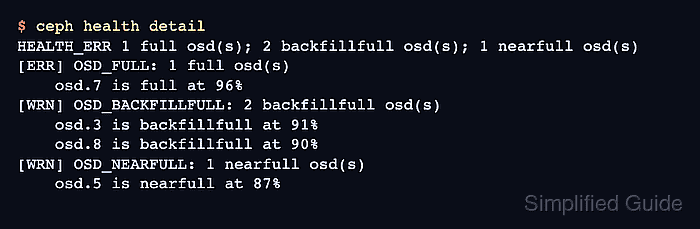
Ceph reports fullness through the OSD map, so ceph health detail, ceph osd df tree, and ceph df detail should be read together. A pool can have a low-looking stored-data percentage while its MAX AVAIL value is small because the most full OSD inside that pool's CRUSH rule limits placement.
Treat ratio changes as emergency breathing room, not as the repair. Add OSD capacity, delete known-disposable data, rebalance an outlier, or replace a failed OSD according to the signal you find, then retest the original health check.
Steps to troubleshoot full Ceph OSDs:
- Confirm the exact Ceph fullness health check.
$ ceph health detail
HEALTH_ERR 1 full osd(s); 2 backfillfull osd(s); 1 nearfull osd(s)
[ERR] OSD_FULL: 1 full osd(s)
    osd.7 is full at 96%
[WRN] OSD_BACKFILLFULL: 2 backfillfull osd(s)
    osd.3 is backfillfull at 91%
    osd.8 is backfillfull at 90%
[WRN] OSD_NEARFULL: 1 nearfull osd(s)
    osd.5 is nearfull at 87%
OSD_FULL blocks writes to affected pools. OSD_BACKFILLFULL blocks backfill into the affected OSD. OSD_NEARFULL is the early warning.
- Identify the full OSD and its host in the CRUSH tree.
$ ceph osd df tree
ID  CLASS WEIGHT  REWEIGHT SIZE   RAW USE DATA   OMAP    META  AVAIL %USE  VAR  PGS STATUS TYPE NAME
-1        54.00000        - 54 TiB 45 TiB 44 TiB 34 GiB 1.2 TiB 8.7 TiB 83.8 1.00   -        root default
-3        18.00000        - 18 TiB 16 TiB 15 TiB 12 GiB 410 GiB 1.8 TiB 89.9 1.07   -            host ceph-node2
 7   hdd   6.00000  1.00000  6 TiB 5.8 TiB 5.7 TiB 2 GiB 128 GiB 230 GiB 96.2 1.15 124     up         osd.7
 8   hdd   6.00000  1.00000  6 TiB 5.4 TiB 5.3 TiB 8 GiB 140 GiB 590 GiB 90.1 1.08 118     up         osd.8
 9   hdd   6.00000  1.00000  6 TiB 4.8 TiB 4.7 TiB 2 GiB 120 GiB 1.2 TiB 80.3 0.96 109     up         osd.9
##### snipped #####
A high VAR value on one OSD points to imbalance. Similar %USE values across the same device class usually point to real capacity pressure instead.
- Check the active fullness ratios and OSD map flags.
$ ceph osd dump
epoch 772
fsid 4f6a6b72-1d5a-4d53-ae34-9db8c1d4f0f4
created 2026-06-02T08:12:31.514522+0000
modified 2026-06-29T04:36:10.944771+0000
flags sortbitwise,recovery_deletes
full_ratio 0.95
backfillfull_ratio 0.90
nearfull_ratio 0.85
##### snipped #####
Do not raise full_ratio or backfillfull_ratio as the first fix. A small temporary increase can restore writes in an emergency, but it also reduces the safety margin that prevents OSDs from running out of usable space.
- Find the pool whose placement is constrained by the full OSD.
$ ceph df detail
--- RAW STORAGE ---
CLASS  SIZE   AVAIL  USED   RAW USED  %RAW USED
hdd    54 TiB 8.7 TiB 45 TiB 45 TiB       83.80
TOTAL  54 TiB 8.7 TiB 45 TiB 45 TiB       83.80

--- POOLS ---
POOL          ID PGS STORED  (DATA)  (OMAP) OBJECTS USED   (DATA)  (OMAP) %USED MAX AVAIL
rbd            4 256 15 TiB  15 TiB   6 GiB  4.18 M 45 TiB 45 TiB  18 GiB 91.7    510 GiB
cephfs_data    5 128  3 TiB   3 TiB  28 GiB  1.02 M  9 TiB  9 TiB  84 GiB 34.8    510 GiB
.mgr           1   1 96 MiB  96 MiB      0 B     31 288 MiB 288 MiB    0 B  0.0    510 GiB
MAX AVAIL is the important capacity clue when OSD fullness is uneven. If every active pool shows a small MAX AVAIL because of the same OSD, fix that OSD or placement imbalance before treating the whole cluster as evenly full.
- Check whether recovery or backfill is blocked by space.
$ ceph -s
cluster:
  id:     4f6a6b72-1d5a-4d53-ae34-9db8c1d4f0f4
  health: HEALTH_ERR
          1 full osd(s)
          8 pgs backfill_toofull
          Degraded data redundancy: 1245/982344 objects degraded (0.127%), 18 pgs degraded

services:
  mon: 3 daemons, quorum ceph-node1,ceph-node2,ceph-node3
  mgr: ceph-node1(active), standbys: ceph-node2
  osd: 9 osds: 9 up, 9 in

data:
  pools:   3 pools, 385 pgs
  objects: 982.34k objects, 18 TiB
  usage:   45 TiB used, 8.7 TiB / 54 TiB avail
  pgs:     8 active+remapped+backfill_toofull
           18 active+degraded
           359 active+clean
backfill_toofull means Ceph wants to move data but the target OSD is refusing more backfill because it is already beyond the backfill-full threshold.
- Match the finding to the remediation path.
If one OSD is the outlier and peer OSDs have room, rebalance or reweight that OSD. If all OSDs in the device class are near the same ratio, add capacity or remove known-disposable data from the consuming pool. If a failed OSD or host caused the pressure, replace or recover that component before forcing data movement.
Related: How to reweight Ceph OSDs by utilization
Related: How to replace a failed Ceph OSD - Recheck the original health detail after the selected remediation.
$ ceph health detail
HEALTH_OK
If the result still reports OSD_BACKFILLFULL or OSD_NEARFULL, repeat the OSD and pool checks before changing thresholds so you know whether the remaining problem is capacity, placement, or a failed component.
- Confirm that placement groups are no longer blocked by the full OSD.
$ ceph -s
cluster:
  id:     4f6a6b72-1d5a-4d53-ae34-9db8c1d4f0f4
  health: HEALTH_OK

services:
  mon: 3 daemons, quorum ceph-node1,ceph-node2,ceph-node3
  mgr: ceph-node1(active), standbys: ceph-node2
  osd: 9 osds: 9 up, 9 in

data:
  pools:   3 pools, 385 pgs
  objects: 982.34k objects, 18 TiB
  usage:   43 TiB used, 11 TiB / 54 TiB avail
  pgs:     385 active+clean