How to reweight Ceph OSDs by utilization
Ceph clusters can run out of placement room on one OSD while neighboring OSDs still have spare capacity. The override reweight value on an OSD tells CRUSH to place less data on that specific daemon, so a careful utilization-based reweight can lower pressure on the fullest disks without changing their permanent capacity weight.
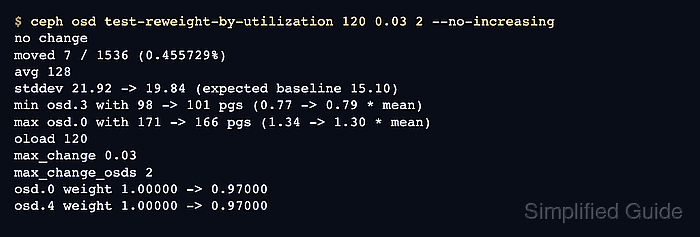
ceph osd reweight-by-utilization calculates temporary override changes from ceph osd df utilization. That override is separate from CRUSH weight, which should continue to reflect the device's real size. A small dry-run adjustment is safer than a large one because every accepted change can trigger placement group movement.
Manual override reweights are a short-term operator control. Ceph's balancer, especially in upmap mode, should own long-term placement in recent clusters, and full or backfillfull OSDs need free space before rebalancing can help. Start with a cluster whose placement groups are not already stuck, keep each change small, and watch recovery until placement groups return to active+clean.
Related: How to check Ceph cluster health
Related: How to troubleshoot full Ceph OSDs
Steps to reweight Ceph OSDs by utilization:
- Check cluster health before changing OSD weights.
$ ceph -s
  cluster:
    id:     6b9f2d1a-3c4e-4f50-9a72-2c1e31f0a5b8
    health: HEALTH_WARN
            1 nearfull osd(s)

  services:
    mon: 3 daemons, quorum ceph-admin,ceph-node1,ceph-node2
    mgr: ceph-admin(active)
    osd: 6 osds: 6 up, 6 in

  data:
    pgs:     128 active+clean
    usage:   14 TiB used, 22 TiB / 36 TiB avail
Proceed when placement groups are active+clean and the warning is capacity imbalance, not a failed OSD or stuck placement group.
Related: How to check Ceph cluster health - List OSD utilization and current override reweights.
$ ceph osd df
ID  CLASS  WEIGHT   REWEIGHT  SIZE     RAW USE  DATA     OMAP     META     AVAIL    %USE   VAR   PGS  STATUS
 0    hdd  3.63899   1.00000  3.6 TiB  2.9 TiB  2.9 TiB  12 MiB  3.1 GiB  734 GiB  80.01  1.25  112      up
 1    hdd  3.63899   1.00000  3.6 TiB  2.2 TiB  2.2 TiB  11 MiB  2.8 GiB  1.4 TiB  60.22  0.91   86      up
 2    hdd  3.63899   1.00000  3.6 TiB  1.8 TiB  1.8 TiB  10 MiB  2.4 GiB  1.8 TiB  50.86  0.77   72      up
##### snipped #####
                    TOTAL  21.8 TiB 14.4 TiB 14.3 TiB  64 MiB   18 GiB  7.4 TiB  66.02
MIN/MAX VAR: 0.77/1.25  STDDEV: 8.74
The VAR column compares each OSD to the cluster average. A value far above 1.00 is fuller than average.
- Check whether the balancer is already managing placement.
$ ceph balancer status
{
    "active": false,
    "mode": "upmap",
    "plans": []
}
If active is true, avoid mixing new override reweights with balancer-managed placement unless the change is an emergency short-term correction.
- Preview a small utilization-based reweight.
$ ceph osd test-reweight-by-utilization 120 0.03 2 --no-increasing
no change
moved 7 / 1536 (0.455729%)
avg 128
stddev 21.92 -> 19.84 (expected baseline 15.10)
min osd.3 with 98 -> 101 pgs (0.77 -> 0.79 * mean)
max osd.0 with 171 -> 166 pgs (1.34 -> 1.30 * mean)
oload 120
max_change 0.03
max_change_osds 2
average_utilization 66.02
overload_utilization 79.22
osd.0 weight 1.00000 -> 0.97000
osd.4 weight 1.00000 -> 0.97000
120 targets OSDs at least 20 percent above average. 0.03 limits each override change, 2 limits how many OSDs change, and --no-increasing avoids raising underfull OSD weights.
- Apply the previewed reweight when the proposed OSDs match the imbalance.
$ ceph osd reweight-by-utilization 120 0.03 2 --no-increasing
moved 7 / 1536 (0.455729%)
avg 128
stddev 21.92 -> 19.84 (expected baseline 15.10)
min osd.3 with 98 -> 101 pgs (0.77 -> 0.79 * mean)
max osd.0 with 171 -> 166 pgs (1.34 -> 1.30 * mean)
oload 120
max_change 0.03
max_change_osds 2
osd.0 weight 1.00000 -> 0.97000
osd.4 weight 1.00000 -> 0.97000
This command changes OSD override weights and can move data. Stop and add capacity or remove data instead when OSDs are full or backfillfull.
- Watch recovery after the reweight.
$ ceph -s
  cluster:
    health: HEALTH_WARN
            Degraded data redundancy: 0.455% objects misplaced

  data:
    pgs:     124 active+clean
             4 active+remapped+backfill_wait

  io:
    recovery: 84 MiB/s, 21 objects/s
Backfill can take minutes or hours. Wait for placement groups to return to active+clean before making another manual adjustment.
- Confirm the adjusted OSDs and final utilization spread.
$ ceph osd df
ID  CLASS  WEIGHT   REWEIGHT  SIZE     RAW USE  DATA     OMAP     META     AVAIL    %USE   VAR   PGS  STATUS
 0    hdd  3.63899   0.97000  3.6 TiB  2.8 TiB  2.8 TiB  12 MiB  3.0 GiB  822 GiB  77.90  1.17  106      up
 1    hdd  3.63899   1.00000  3.6 TiB  2.2 TiB  2.2 TiB  11 MiB  2.8 GiB  1.4 TiB  61.10  0.92   88      up
 2    hdd  3.63899   1.00000  3.6 TiB  1.9 TiB  1.9 TiB  10 MiB  2.5 GiB  1.7 TiB  56.42  0.85   80      up
##### snipped #####
                    TOTAL  21.8 TiB 14.4 TiB 14.3 TiB  64 MiB   18 GiB  7.4 TiB  66.02
MIN/MAX VAR: 0.85/1.17  STDDEV: 6.10
Keep track of any REWEIGHT value below 1.00000. Reset temporary overrides one OSD at a time when placement returns to balancer-managed operation.
- Confirm placement groups are clean after the reweight settles.
$ ceph -s
  cluster:
    id:     6b9f2d1a-3c4e-4f50-9a72-2c1e31f0a5b8
    health: HEALTH_OK

  services:
    mon: 3 daemons, quorum ceph-admin,ceph-node1,ceph-node2
    mgr: ceph-admin(active)
    osd: 6 osds: 6 up, 6 in

  data:
    pgs:     128 active+clean
    usage:   14 TiB used, 22 TiB / 36 TiB avail