How to use glob options in Bash
Filename expansion is an argument-building stage in Bash, so a wildcard can change what a command receives before that command starts. Scripts that rely on the default rules may retain an unmatched pattern as literal text, omit hidden names, or stop at one directory level.
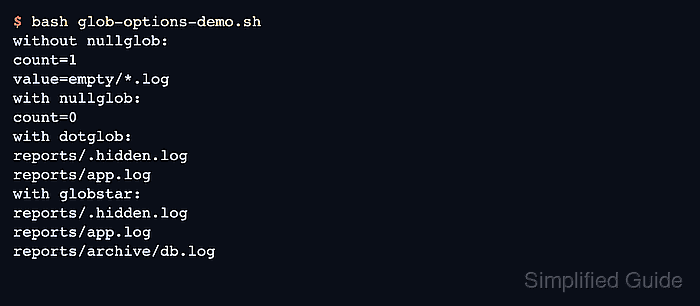
The shopt builtin changes those rules for the current shell. Arrays make the result visible without another parsing step: nullglob produces zero elements for an unmatched pattern, dotglob admits names beginning with a dot, and globstar lets ** cross directory boundaries.
An empty array suits optional input, while failglob is the stricter alternative when missing input should stop expansion with an error. Running the finished file with bash glob-options-demo.sh confines its option changes to that child shell instead of changing the interactive parent shell.
Related: How to use arrays in Bash
Related: How to loop over files in Bash
Related: How to create and run a Bash script
Steps to use Bash glob options:
- Create the recursive and unmatched-match directory branches under glob-sample.
$ mkdir -p glob-sample/logs/archive glob-sample/empty
- Create visible, hidden, and nested log files in the test tree.
$ touch glob-sample/logs/app.log glob-sample/logs/.hidden.log glob-sample/logs/archive/db.log
- Create glob-options-demo.sh with the required root argument and Bash's default unmatched-pattern check.
- glob-options-demo.sh
#!/usr/bin/env bash
set -u

root=${1:?Usage: bash glob-options-demo.sh ROOT}

default_empty=("$root"/empty/*.log)
printf 'default empty matches: %d\n' "${#default_empty[@]}"
printf '  <%s>\n' "${default_empty[@]}"
Without nullglob or failglob, an unmatched filename pattern remains unchanged and becomes one array element.
- Append the nullglob empty-array check after the default check.
shopt -s nullglob
null_empty=("$root"/empty/*.log)
printf 'nullglob empty matches: %d\n' "${#null_empty[@]}"
failglob is the alternative for workflows where an unmatched pattern must stop the shell command rather than produce an empty array.
- Append the dotglob top-level log collection after the nullglob block.
shopt -s dotglob
top_logs=("$root"/logs/*.log)
printf 'dotglob top-level logs:\n'
printf '  %s\n' "${top_logs[@]}"
The existing nullglob setting remains enabled because shopt -s changes only the named option.
- Append the globstar recursive log collection after the dotglob block.
shopt -s globstar
all_logs=("$root"/logs/**/*.log)
printf 'globstar recursive logs:\n'
printf '  %s\n' "${all_logs[@]}"
The ** component matches zero or more directory levels, and the active dotglob setting keeps the hidden log in the result.
- Compare glob-options-demo.sh with the consolidated source.
- glob-options-demo.sh
#!/usr/bin/env bash
set -u

root=${1:?Usage: bash glob-options-demo.sh ROOT}

default_empty=("$root"/empty/*.log)
printf 'default empty matches: %d\n' "${#default_empty[@]}"
printf '  <%s>\n' "${default_empty[@]}"

shopt -s nullglob
null_empty=("$root"/empty/*.log)
printf 'nullglob empty matches: %d\n' "${#null_empty[@]}"

shopt -s dotglob
top_logs=("$root"/logs/*.log)
printf 'dotglob top-level logs:\n'
printf '  %s\n' "${top_logs[@]}"

shopt -s globstar
all_logs=("$root"/logs/**/*.log)
printf 'globstar recursive logs:\n'
printf '  %s\n' "${all_logs[@]}"
- Check glob-options-demo.sh for Bash syntax errors.
$ bash -n glob-options-demo.sh
No output means Bash parsed the file without finding a syntax error.
- Run glob-options-demo.sh against glob-sample to compare the expanded match sets.
$ bash glob-options-demo.sh glob-sample
default empty matches: 1
  <glob-sample/empty/*.log>
nullglob empty matches: 0
dotglob top-level logs:
  glob-sample/logs/.hidden.log
  glob-sample/logs/app.log
globstar recursive logs:
  glob-sample/logs/.hidden.log
  glob-sample/logs/app.log
  glob-sample/logs/archive/db.log