How to enable color output in Bash scripts
Status labels become easier to distinguish when terminal color reinforces words such as ERROR, OK, and WARN. ANSI Select Graphic Rendition sequences let a Bash script style those labels without changing the message text that follows them.
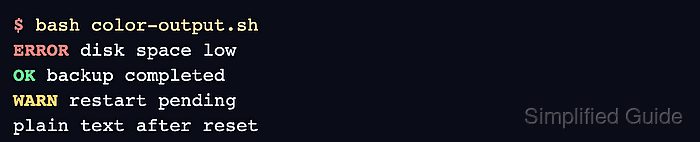
ANSI-C quoting converts sequences such as $'\e[31m' into terminal-control bytes when the script assigns its color variables. A fixed printf format keeps the label, reset sequence, and message in separate arguments, so message text cannot become another format directive.
The color policy applies styling only when standard output is a terminal and NO_COLOR is empty or unset. Redirected output therefore remains plain for log processors, while a nonempty NO_COLOR gives callers an explicit opt-out and the reset sequence prevents later output from inheriting a label color.
Related: How to create and run a Bash script
Related: How to use variables in Bash scripts
Related: How to use conditionals in Bash scripts
Steps to enable color output in Bash scripts:
- Create color-output.sh with strict unset-variable handling and the ANSI color variables.
- color-output.sh
#!/usr/bin/env bash
set -u

red=$'\e[31m'
green=$'\e[32m'
yellow=$'\e[33m'
reset=$'\e[0m'
The codes 31, 32, and 33 select red, green, and yellow foreground colors. Code 0 resets the terminal attributes.
- Insert the terminal and NO_COLOR policy after the reset assignment.
if [[ ! -t 1 || -n ${NO_COLOR:-} ]]; then
    red=
    green=
    yellow=
    reset=
fi
The -t 1 expression checks standard output. A non-terminal destination or a nonempty NO_COLOR value replaces each control sequence with an empty string.
- Append the print_status function after the conditional.
print_status() {
    local color=$1
    local label=$2
    local message=$3

    printf '%s%-5s%s %s\n' "$color" "$label" "$reset" "$message"
}
The fixed format string prints message text as data. The -5s field keeps the labels aligned, and the reset argument ends the color before the message.
- Append the status calls and plain output call after the function.
print_status "$red" ERROR 'disk space low'
print_status "$green" OK 'backup completed'
print_status "$yellow" WARN 'restart pending'
printf 'plain text after reset\n'
The reset argument belongs inside print_status before the message. Omitting it can color the remaining text and later terminal output.
- Compare color-output.sh with the consolidated file.
- color-output.sh
#!/usr/bin/env bash
set -u

red=$'\e[31m'
green=$'\e[32m'
yellow=$'\e[33m'
reset=$'\e[0m'

if [[ ! -t 1 || -n ${NO_COLOR:-} ]]; then
    red=
    green=
    yellow=
    reset=
fi

print_status() {
    local color=$1
    local label=$2
    local message=$3

    printf '%s%-5s%s %s\n' "$color" "$label" "$reset" "$message"
}

print_status "$red" ERROR 'disk space low'
print_status "$green" OK 'backup completed'
print_status "$yellow" WARN 'restart pending'
printf 'plain text after reset\n'
- Check the completed script for syntax errors.
$ bash -n color-output.sh
No output means Bash parsed the conditional, function, and calls without a syntax error.
- Run the script with NO_COLOR set in an interactive terminal.
$ NO_COLOR=1 bash color-output.sh
ERROR disk space low
OK    backup completed
WARN  restart pending
plain text after reset
Every line uses the terminal's default color because the nonempty environment variable disables the ANSI sequences.
- Redirect standard output to color-output.log.
$ bash color-output.sh > color-output.log
- Inspect nonprinting bytes in the redirected output.
$ cat -v color-output.log
ERROR disk space low
OK    backup completed
WARN  restart pending
plain text after reset
cat -v would display an escape byte as ^[. Its absence confirms that the log contains plain text rather than hidden color sequences.
- Run the script without NO_COLOR in an interactive terminal.
$ bash color-output.sh
ERROR disk space low
OK    backup completed
WARN  restart pending
plain text after reset
ERROR appears red, OK green, and WARN yellow. The message text and final line remain in the terminal's default color, which confirms that each status call applies its reset.
- Remove the temporary redirected-output file.
$ rm color-output.log