How to install Apache Cassandra on Ubuntu or Debian
Installing Apache Cassandra on Ubuntu or Debian gives operators an APT-managed local node for schema testing, driver smoke checks, or the first host in a single-node lab. The Apache Cassandra repository supplies current project packages, while the operating system still owns service startup, log rotation, and package upgrades.
Current Cassandra binary packages can run with Java 11 or Java 17, and OpenJDK 17 is available from current APT repositories. The Apache repository series name uses the major Cassandra version without the dot and an x suffix, which keeps the package source tied to the intended release line.
The package keeps Cassandra under the Debian-family service layout and may start the service automatically after installation. Treat the default install as a local single-node setup until listen addresses, seed nodes, authentication, and replication are planned separately. On newer Ubuntu releases where the default Python is outside cqlsh support, use nodetool for the install proof before preparing cqlsh access.
Steps to install Apache Cassandra on Ubuntu or Debian:
- Open a terminal with sudo privileges.
- Refresh the package index.
$ sudo apt update
- Install Java and repository helper tools.
$ sudo apt install ca-certificates curl gnupg openjdk-17-jre-headless
ca-certificates lets curl validate Apache HTTPS endpoints, gnupg supports signed repository metadata, and OpenJDK 17 runs the Cassandra 5.0 package.
- Confirm the active Java runtime.
$ java -version
openjdk version "17.0.19" 2026-04-21
OpenJDK Runtime Environment (build 17.0.19+10-1-26.04.2-Ubuntu)
OpenJDK 64-Bit Server VM (build 17.0.19+10-1-26.04.2-Ubuntu, mixed mode, sharing)
The exact OpenJDK patch version changes with operating-system updates. Cassandra 5.0 binary packages can also run on Java 11 when that is the platform standard.
- Create the APT keyring directory.
$ sudo install -d -m 0755 /etc/apt/keyrings
- Download the Apache Cassandra repository key.
$ sudo curl -fsSL -o /etc/apt/keyrings/apache-cassandra.asc https://downloads.apache.org/cassandra/KEYS
- Add the Cassandra 5.0 APT repository.
$ echo "deb [signed-by=/etc/apt/keyrings/apache-cassandra.asc] https://debian.cassandra.apache.org 50x main" | sudo tee /etc/apt/sources.list.d/cassandra.sources.list
deb [signed-by=/etc/apt/keyrings/apache-cassandra.asc] https://debian.cassandra.apache.org 50x main
Use 50x for Cassandra 5.0. Choose another repository series only when deliberately installing an older supported major release.
- Refresh the package index again.
$ sudo apt update
Get:1 https://apache.jfrog.io/artifactory/cassandra-deb 50x InRelease [3902 B]
Get:2 https://apache.jfrog.io/artifactory/cassandra-deb 50x/main arm64 Packages [696 B]
Reading package lists... Done
The repository may appear as debian.cassandra.apache.org in the source file and as Apache's backing package host in APT output.
- Check the Cassandra package candidate.
$ apt-cache policy cassandra cassandra: Installed: (none) Candidate: 5.0.8 Version table: 5.0.8 500 500 https://debian.cassandra.apache.org 50x/main arm64 Packages - Install the Cassandra package.
$ sudo apt install cassandra
Reading package lists... Done
Building dependency tree... Done
The following NEW packages will be installed:
  cassandra
##### snipped #####
Setting up cassandra (5.0.8) ...
The package stores configuration under /etc/cassandra, data under /var/lib/cassandra, and logs under /var/log/cassandra.
- Confirm that the package is installed.
$ dpkg-query --show cassandra
cassandra 5.0.8
- Start Cassandra if the package did not already start it.
$ sudo service cassandra start
On systemd hosts, cassandra.service maps to the packaged service script. Startup can take a minute while system keyspaces are initialized.
Related: How to check Apache Cassandra service status - Check the local Cassandra node state.
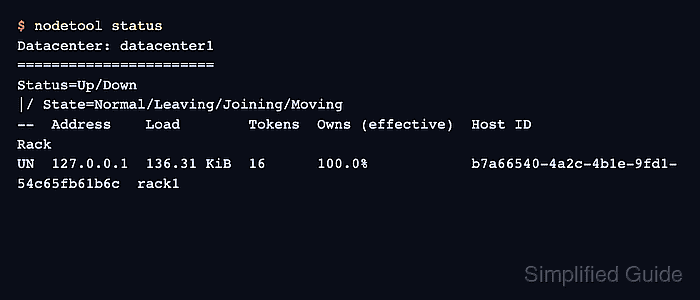
$ nodetool status
Datacenter: datacenter1
=======================
Status=Up/Down
|/ State=Normal/Leaving/Joining/Moving
--  Address    Load        Tokens  Owns (effective)  Host ID                               Rack
UN  127.0.0.1  136.31 KiB  16      100.0%            b7a66540-4a2c-4b1e-9fd1-54c65fb61b6c  rack1
UN means the local node is up and normal from Cassandra's ring view. Use cqlsh only after its Python runtime requirement is satisfied on the host.
Related: How to check Apache Cassandra cluster status with nodetool
Related: How to connect to Apache Cassandra with cqlsh