How to enable Apache Cassandra incremental backups
An Apache Cassandra cluster that relies only on occasional snapshots can miss writes created after the last snapshot when a table needs recovery. Incremental backups add hard links for newly flushed SSTables under each table's backups directory, giving operators a smaller change set to ship between full snapshot copies.
Cassandra controls the persistent default with incremental_backups in cassandra.yaml. The live process can also be changed with nodetool enablebackup, and nodetool statusbackup reports whether the current node is creating backup links for newly flushed or streamed SSTables.
Run the change on every node that owns replicas, then pair it with a snapshot schedule, off-node copy process, and retention cleanup. Incremental backups can grow local data volumes quickly because every flush creates another SSTable component set under backups until those files are copied and removed by an operator-managed process.
Steps to enable Apache Cassandra incremental backups:
- Check the current backup state on the node.
$ nodetool statusbackup
not running
not running means the node is not creating incremental backup links for new SSTables. Check each node separately because the setting is node-local.
- Back up the Cassandra configuration file.
$ sudo cp -a /etc/cassandra/cassandra.yaml /etc/cassandra/cassandra.yaml.bak
- Open the active Cassandra configuration file.
$ sudoedit /etc/cassandra/cassandra.yaml
Package installs commonly use /etc/cassandra/cassandra.yaml. Tarball installs use conf/cassandra.yaml under the Cassandra installation directory.
- Set incremental_backups to true.
- /etc/cassandra/cassandra.yaml
incremental_backups: true
This file change preserves the setting across future restarts. It does not copy old SSTables or replace a full snapshot baseline.
- Enable incremental backups in the running Cassandra process.
$ nodetool enablebackup
nodetool enablebackup changes the live node without editing cassandra.yaml. Keep the file setting aligned so a later restart does not revert the node to its old default.
- Verify the live backup state.
$ nodetool statusbackup
running
- Flush a table that has recent writes.
$ nodetool flush app_data orders
Replace app_data and orders with a keyspace and table that are safe to flush. A table with no new memtable data may not create visible new backup files.
- Locate the table backup directory.
$ sudo find /var/lib/cassandra/data/app_data -type d -name backups
/var/lib/cassandra/data/app_data/orders-6a1adbe06a0211f184742b61a3e0ec16/backups
Use the Cassandra data directory for the node being checked. Package installs commonly store table data under /var/lib/cassandra/data.
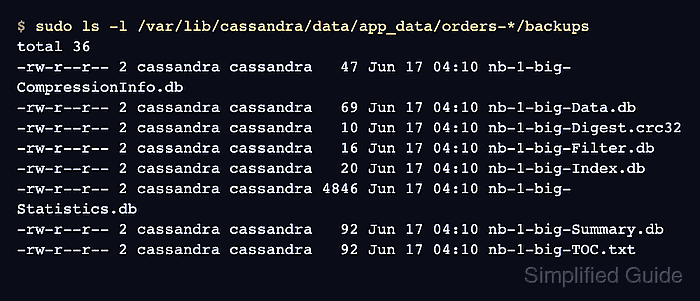
- Confirm the flushed SSTable files appear in the backup directory.
$ sudo ls -l /var/lib/cassandra/data/app_data/orders-*/backups
total 36
-rw-r--r-- 2 cassandra cassandra   47 Jun 17 04:10 nb-1-big-CompressionInfo.db
-rw-r--r-- 2 cassandra cassandra   69 Jun 17 04:10 nb-1-big-Data.db
-rw-r--r-- 2 cassandra cassandra   10 Jun 17 04:10 nb-1-big-Digest.crc32
-rw-r--r-- 2 cassandra cassandra   16 Jun 17 04:10 nb-1-big-Filter.db
-rw-r--r-- 2 cassandra cassandra   20 Jun 17 04:10 nb-1-big-Index.db
-rw-r--r-- 2 cassandra cassandra 4846 Jun 17 04:10 nb-1-big-Statistics.db
-rw-r--r-- 2 cassandra cassandra   92 Jun 17 04:10 nb-1-big-Summary.db
-rw-r--r-- 2 cassandra cassandra   92 Jun 17 04:10 nb-1-big-TOC.txt
The link count of 2 shows that each listed component is a hard link to an SSTable component created by the flush.
- Repeat the configuration and live enablement on each remaining Cassandra node.
A single enabled node only protects SSTables owned by that node. Enable, verify, ship, and clean up incremental backups per node so every replica owner has the same backup coverage.