How to enable authentication in Apache Cassandra
An Apache Cassandra cluster that still accepts CQL connections without credentials lets any reachable client run queries under the default open configuration. Enabling password authentication makes the native protocol require a database role before cqlsh, drivers, or application clients can execute CQL.
Cassandra controls client authentication with the authenticator setting in /etc/cassandra/cassandra.yaml for package installs, or conf/cassandra.yaml for tarball installs. PasswordAuthenticator stores role names and hashed passwords in the system_auth keyspace, so that keyspace needs a replication layout that stays available before the setting is rolled across the cluster.
Apply the change from one selected node, create a replacement administrative role, and restart the remaining nodes one at a time. Authentication does not encrypt client traffic, grant table permissions, or secure JMX by itself; pair it with client TLS, role grants, and JMX controls when the cluster is reachable outside a trusted administration network.
Steps to enable Apache Cassandra authentication:
- Confirm the selected node currently accepts CQL.
$ cqlsh -e "SELECT release_version FROM system.local;"

 release_version
-----------------
           5.0.8

(1 rows)
Run the bootstrap work from one node first. Keep application clients away from that node until replacement roles and credentials are ready.
- Set system_auth replication for the cluster.
$ cqlsh -e "ALTER KEYSPACE system_auth WITH replication = {'class': 'NetworkTopologyStrategy', 'datacenter1': 3};"Replace datacenter1 with the datacenter name shown by nodetool status or system.local. Use a replication factor that the datacenter can satisfy; a one-node lab uses 1, while production clusters normally use at least 3 per datacenter.
- Repair system_auth if the replication setting changed on an existing cluster.
$ nodetool repair system_auth
Run repair before relying on the new auth replicas. A new one-node lab that kept replication at 1 does not need this step.
- Open the active cassandra.yaml file.
$ sudo vi /etc/cassandra/cassandra.yaml
For a tarball install, edit conf/cassandra.yaml under the Cassandra install directory instead of /etc/cassandra/cassandra.yaml.
- Set PasswordAuthenticator and keep CassandraRoleManager.
- /etc/cassandra/cassandra.yaml
authenticator: PasswordAuthenticator
role_manager: CassandraRoleManager
PasswordAuthenticator requires Cassandra's role manager because login roles and password hashes are stored in system_auth.
- Restart the selected Cassandra node.
$ sudo systemctl restart cassandra
Restart only the selected node at this point. Wait for it to rejoin before changing the next node.
Related: How to check Apache Cassandra service status - Verify unauthenticated CQL is rejected.
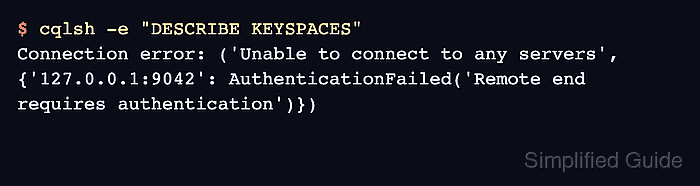
$ cqlsh -e "DESCRIBE KEYSPACES"
Connection error: ('Unable to connect to any servers', {'127.0.0.1:9042': AuthenticationFailed('Remote end requires authentication')})
This rejection confirms the native protocol now asks clients to authenticate before returning schema or data.
- Log in with the default Cassandra superuser on the selected node.
$ cqlsh -u cassandra -p cassandra -e "LIST ROLES;"

 role      | super | login | options | datacenters
-----------+-------+-------+---------+-------------
 cassandra |  True |  True |        {} |         ALL

(1 rows)
The default cassandra credentials are a bootstrap path only. Replace them before reconnecting normal clients. For routine use, avoid putting passwords in shell history and use a cqlsh credentials file or an interactive password prompt.
- Create a replacement superuser role.
$ cqlsh -u cassandra -p cassandra -e "CREATE ROLE cluster_admin WITH SUPERUSER = true AND LOGIN = true AND PASSWORD = 'UseALongUniquePasswordHere!2026';"
Replace the sample password with a unique secret from the cluster's password process before running the command.
- Disable login and superuser status on the default role from the replacement role.
$ cqlsh -u cluster_admin -p 'UseALongUniquePasswordHere!2026' -e "ALTER ROLE cassandra WITH SUPERUSER = false AND LOGIN = false;"
- Verify the replacement role and the disabled default role.
$ cqlsh -u cluster_admin -p 'UseALongUniquePasswordHere!2026' -e "LIST ROLES;" role | super | login | options | datacenters ---------------+-------+-------+---------+------------- cassandra | False | False | {} | ALL cluster_admin | True | True | {} | ALL (2 rows) - Create application login roles before reconnecting clients.
$ cqlsh -u cluster_admin -p 'UseALongUniquePasswordHere!2026' -e "CREATE ROLE app_service WITH LOGIN = true AND PASSWORD = 'UseADifferentLongPasswordHere!2026' AND SUPERUSER = false;"
Authentication proves client identity. Use authorization grants separately when the role should be limited to specific keyspaces, tables, or functions.
Related: How to grant permissions to an Apache Cassandra role - Repeat the authenticator file change on each remaining Cassandra node.
Restart one node at a time, wait for it to return to UN in nodetool status, and verify authenticated cqlsh access before moving to the next node.
Related: How to check Apache Cassandra cluster status with nodetool